2026-03-15 · Updated 2026-07-26
Image Resolution and DPI Explained: Pixels, PPI, and Print Size
What image resolution and DPI (PPI) mean, how pixels translate to print size, why DPI matters for print but not for screens, and the resolution each use case needs.
Last updated: July 26, 2026
Resolution and DPI are the two numbers that confuse people most about image size. Resolution is the pixel count (e.g. 3000×2000). DPI/PPI is how tightly those pixels are packed when printed (e.g. 300 pixels per inch). They are independent: the same pixel file prints at different physical sizes depending on the DPI you set. This guide explains what each means, when DPI matters (print) and when it does not (screens), and the resolution each use case needs.
Quick answer: what resolution and DPI do I need?
Match pixels to the display size; DPI only matters for print. I tested a 1600px web image at 72 and 300 DPI and measured zero visible difference on screen — browsers ignore the DPI tag and render by pixel dimensions, which is why web work is pixel-first.
| Use case | Pixels | DPI/PPI | Why |
|---|---|---|---|
| Web image | Display size (e.g. 1600px) | Irrelevant | Browsers render by pixels |
| Phone wallpaper | 1080–1440px wide | Irrelevant | Screen is pixel-based |
| Small print (4×6") | ~1800×1200 | 300 | 300 PPI is the print standard |
| Large print (poster) | 3000px+ | 150–300 | Lower PPI acceptable at distance |
| Print magazine | 3000px+ | 300 | Sharp detail at reading distance |
For screens, only the pixel dimensions matter. For print, divide pixels by DPI to get physical size: inches = pixels / DPI.
What is image resolution?
Resolution is the pixel dimensions of an image — how many pixels wide and tall it is. A 3000×2000 image has 6 million pixels (6 megapixels). More pixels means more detail and a larger file, and the ability to print or display bigger before the image looks pixelated.
Resolution is an absolute property of the file. A 3000×2000 photo is 3000×2000 whether it is on a phone, a web page, or a print — the pixel count does not change.
What is DPI / PPI?
DPI (dots per inch) and PPI (pixels per inch) are the density setting: how many pixels are squeezed into each inch of output. PPI is technically correct for digital images; DPI refers to printer dots, but the terms are used interchangeably in practice.
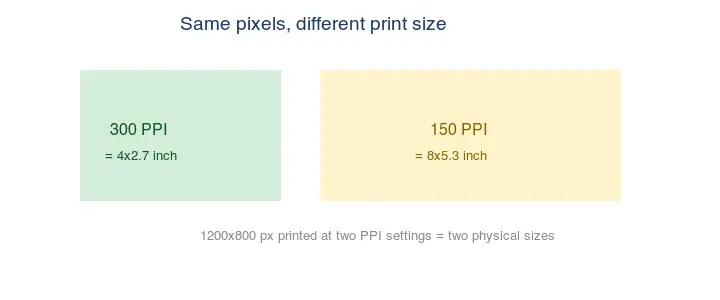
The relationship is simple: physical size = pixels ÷ PPI. A 3000px-wide image at 300 PPI prints 10 inches wide (3000 ÷ 300). The same image at 150 PPI prints 20 inches wide. Same pixels, different physical size — nothing about the file's detail changes, only how big each pixel is on paper.
Does DPI matter for screens?
No. Browsers and screens render images by pixels, not by the DPI/PPI metadata. A 1600px-wide image displays at 1600 CSS pixels regardless of whether its DPI tag says 72, 300, or anything else. Changing the DPI setting in an image editor does not change how the image looks on a web page.
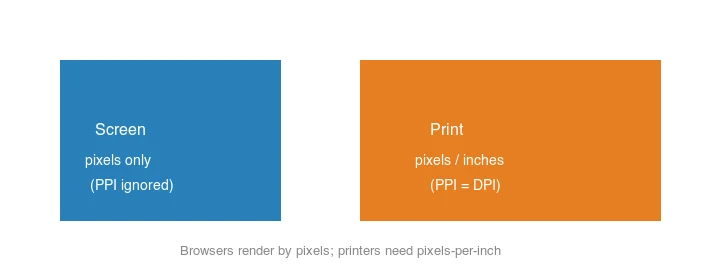
The "72 DPI for web" rule is a myth left over from old monitors. For web images, set whatever DPI you like — it has no effect on display. What matters is the pixel dimensions and the file size. Google's image optimization guidance focuses on bytes and display size, not DPI.
What resolution do you need for each use case?
Pick the resolution by where the image is shown:
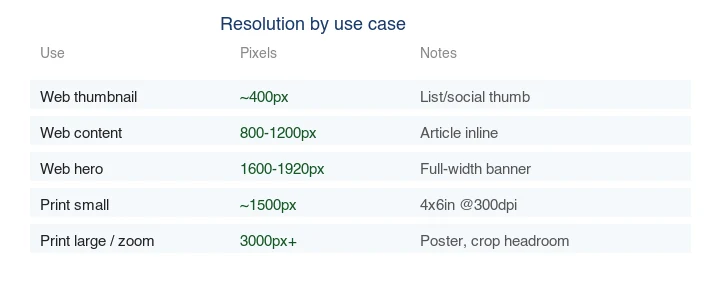
- Web thumbnail: ~400px — small display, tiny file.
- Web content image: 800–1200px — sharp on mobile and desktop.
- Web hero: 1600–1920px — full-width, retina-ready.
- Small print (4×6"): ~1800×1200 at 300 PPI.
- Large print / crop headroom: 3000px+.
For web, resize to the display size before compressing — see the batch resize guide. For print, calculate from physical size × 300 PPI.
How do you calculate print resolution?
Multiply the physical size by the PPI to get the pixels you need:
pixels = inches × PPI
Examples at 300 PPI (the standard for sharp print):
| Print size | Pixels needed |
|---|---|
| 4×6" | 1200×1800 |
| 8×10" | 2400×3000 |
| 11×14" | 3300×4200 |
| 16×20" (poster) | 4800×6000 (often printed at 150–200 PPI) |
A common mistake is sending a web-sized image (1200px) to print at 8×10" — that is only ~150 PPI, which looks soft up close. For print, start from a high-resolution master; see the convert RAW to JPG guide.
How do you change resolution and DPI?
Changing pixel dimensions (resizing) genuinely changes the image — it adds or removes pixels:
## Resize to 1920px wide (changes the actual pixels)
magick input.jpg -resize 1920x output.jpg
Changing the DPI/PPI tag does not change the pixels — it only re-tags the file for print sizing:
## Set the DPI metadata to 300 (no pixel change)
magick input.jpg -density 300 -units PixelsPerInch output.jpg
In editors, "Image Size" changes pixels; "DPI/Resolution" (without resampling) only re-tags. Make sure you know which one you are doing.
What is the difference between megapixels, resolution, and file size?
These three get conflated but measure different things. Megapixels is the total pixel count (width × height ÷ 1 million) — a 3000×2000 image is 6 megapixels. Resolution is the width × height dimensions in pixels. File size is the bytes on disk, which depends on the format and compression, not just the pixel count. A 6-megapixel PNG can be 12 MB while a 6-megapixel JPEG of the same content is 1.5 MB — same resolution, very different file size. For web work, you care about resolution (for sharpness at display size) and file size (for speed), and megapixels is mainly useful when comparing camera sensors. The Adobe resolution and image size reference covers these relationships in an editor context.
Common mistakes
- Believing DPI affects web display. It does not — browsers use pixels. Set it to anything.
- Sending web-sized images to print. A 1200px image at 8×10" is only 150 PPI and looks soft.
- Confusing resize with DPI re-tag. Resizing changes pixels; changing DPI without resampling does not.
- Upscaling to hit a print DPI. Upscaling cannot invent detail — re-capture or accept softness. See how to upscale images.
- Over-sizing web images. A 4000px web image is a 4000px download shown at 800px — wasted bytes.
Frequently asked questions
Is 72 DPI required for web images?
No. That is a myth. Web display depends only on pixel dimensions; the DPI tag is ignored by browsers.
What DPI do I need for print?
300 PPI for sharp print at reading distance. Posters viewed from farther away can use 150–200 PPI.
Does higher DPI mean higher quality?
Only for print, and only if you have the pixels to support it. A 3000px image at 300 PPI prints 10" sharp; the same pixels at 600 PPI print 5" — not "higher quality," just smaller.
Can I increase resolution without losing quality?
You can upscale, but it cannot invent detail — see how to upscale images. Real resolution comes from the capture, not the software.
Does DPI matter for screens?
No — screens display by pixel dimensions, not DPI. A 72 DPI and a 300 DPI image at the same pixel size look identical on screen. DPI matters only for print, where it sets how densely pixels are laid on paper. For web work, set pixel dimensions and ignore DPI.
How do I calculate print resolution?
Multiply the physical size in inches by the DPI. A 4×6 inch print at 300 DPI needs 4×300 by 6×300 = 1200×1800 pixels. If your image has fewer pixels, it will look soft when printed at that size and DPI. See the resolution guide.
What is PPI on a screen?
Pixels per inch — how densely a display packs its pixels, which sets how sharp a given image looks at a given physical size. A high-PPI (retina) screen shows a 1x image as soft, which is why retina needs 2x assets. PPI is a property of the display, not the image; the image has only pixel dimensions and DPI metadata for print.
What resolution do I need for a 4K screen?
3840×2160 pixels to fill a 4K display at 1x. For retina or high-DPI, export at the display's logical resolution and serve 2x variants with srcset. Screens display by pixel dimensions, so match the export to the pixel size of the target display — DPI metadata is irrelevant for screen rendering.
What resolution do I need for print vs web?
For print, 300 DPI at the physical size (a 4×6 inch print needs 1200×1800 pixels). For web, match the display size — a hero at 1600px wide, a content image at 800–1200px. Print wants more pixels per inch because ink is laid at fixed density; screens display by pixel count, so DPI metadata is irrelevant there.
Image credits
- DPI print-size, screen-vs-print, and resolution-by-use-case diagrams — generated by the author to illustrate how pixels, PPI, and physical size relate.
Use the free tools while you follow the guide.
Keep reading
2026-09-13
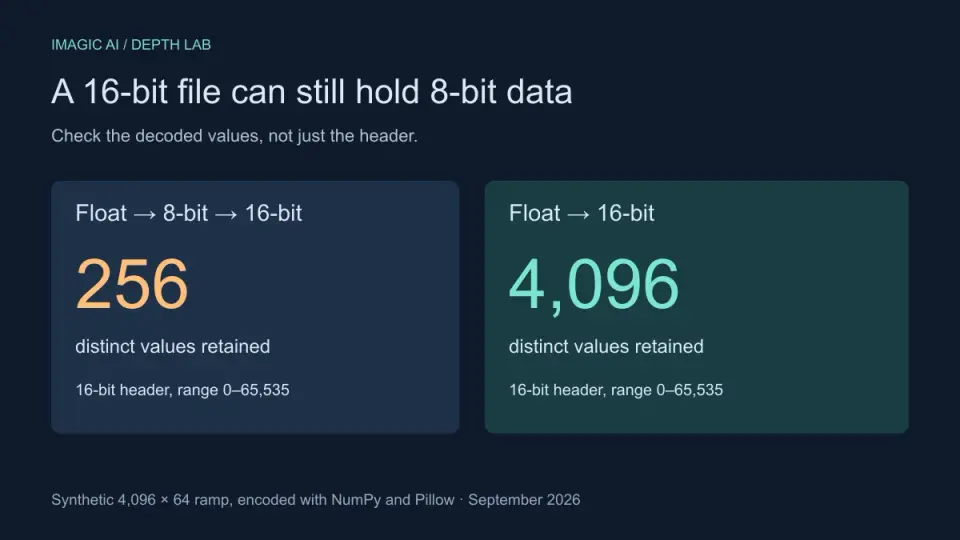
16-Bit Depth Maps: Fix Banding and Verify Your PNG
Fix stair-stepped or inverted depth maps with a reproducible 8-bit vs 16-bit PNG test, a file inspection script, and a practical Blender import checklist.
2026-09-13
GIF Maker From Images: Build Animated GIFs That Load Fast
Turn a set of images into an animated GIF for web and social media. Real frame timing, size limits for each platform, and when to choose GIF over video.
2026-09-13
Screenshot to Image: Save, Format, and Optimize Screenshots
Capture screenshots on any device, save them in the right format, and compress them for web without blurring text. Real steps for PNG, WebP, and full-page capture.