2026-03-20 · Updated 2026-07-26
Image Formats Explained: JPEG, PNG, WebP, GIF, SVG, AVIF
What each image format is for, when to use JPEG vs PNG vs WebP vs AVIF vs SVG vs GIF, with real measured file sizes and a practical decision rule for web images.
Last updated: July 26, 2026
There is no single best image format — each exists because it solves a different problem. JPEG compresses photographs, PNG preserves sharp edges and transparency, WebP and AVIF shrink photos further, SVG scales without pixels, and GIF animates. Picking the right one is a content decision, not a preference. This guide covers what each format does, with real measured file sizes from one source image.
Quick answer: which format should you use?
Match the format to the image content and where it is shown:
| Content | Best format | Why |
|---|---|---|
| Photographs (web) | WebP or AVIF (+ JPEG fallback) | Smallest bytes at good quality |
| Photographs (email/compat) | JPEG | Universal support |
| Sharp graphics, text, UI, logos with transparency | PNG or SVG | No blur on edges |
| Logos, icons, illustrations (vector) | SVG | Scales infinitely, tiny |
| Short animations | AVIF/animated WebP (or GIF) | Far smaller than GIF |
| Archives / masters | PNG or TIFF | Lossless |
For the detailed format-versus-format breakdown, see the AVIF vs WebP vs JPEG comparison.
How do the formats compare?
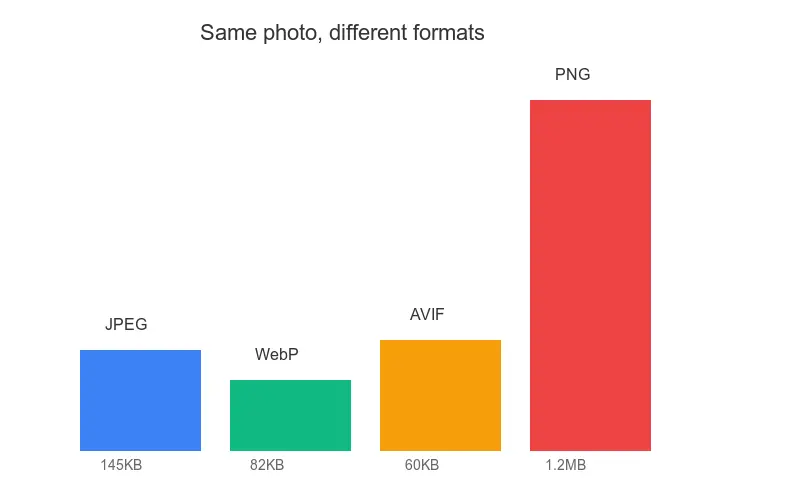
The file-size differences are large and consistent. Measured on one 1400×933 photograph:
| Format | Setting | Size | Use case |
|---|---|---|---|
| PNG | lossless | 853 KB | Graphics, transparency, archives |
| JPEG | q85 | 111 KB | Photos, broad compatibility |
| WebP | q80 | 60 KB | Photos on modern web |
| AVIF | q68 | 44 KB | Photos, smallest, modern browsers |
PNG's 853 KB is the standout: lossless storage of a photograph costs roughly 8× more than JPEG and 19× more than AVIF. That is why PNG is wrong for full-page photos even though it is technically capable of storing them.
JPEG — the photograph workhorse
JPEG (1992) is the lossy format for photographs. It throws away high-frequency detail the eye barely sees, which is why it shrinks photos dramatically but blurs sharp text and thin lines.
- Best for: photographs, gradients, complex real-world scenes.
- Avoid for: text, UI screenshots, sharp line art, anything needing transparency (JPEG has no alpha channel).
- Watch out for: visible 8×8 blocking artifacts below quality ~70.
Use quality 80–85 for web photos. See how to compress JPEG.
PNG — sharp edges and transparency
PNG is lossless and supports a full alpha channel, so it preserves every pixel and any transparency. The cost is file size: it does not compress photographs well.
- Best for: graphics with sharp edges, text, logos, UI screenshots, transparent images.
- Avoid for: full-page photographs (use WebP/AVIF/JPEG instead — see the table above).
- Watch out for: huge files on photographs. Reduce with PNG-8 (≤256 colors) for flat graphics.
For transparency specifics, see how to make transparent images.
WebP — the modern web default
WebP (2010) does both lossy and lossless, supports alpha, and beats JPEG by ~25–35% at matched quality. Modern browser support is ~98%.
- Best for: web photographs and transparent web images where bytes matter.
- Avoid for: email and very old clients (use JPEG/PNG fallback).
- Serve with: a JPEG/PNG fallback in a
<picture>element.
AVIF — the smallest photos
AVIF (2019) uses the AV1 video codec's intra-frame tools and beats WebP by another 20–30%. Support is ~96% and growing.
- Best for: photographs where the smallest bytes matter (hero images, LCP).
- Avoid for: when you cannot afford slow encoding, or for the very oldest browsers (use the
<picture>fallback). - Watch out for: smearing of fine texture at very low quality (<q40).
SVG — vectors that scale
SVG is a vector format: it stores shapes, not pixels, so it scales to any size without losing sharpness and is tiny for simple art.
- Best for: logos, icons, simple illustrations, anything that must scale.
- Avoid for: photographs (SVG cannot represent them efficiently).
- Watch out for: complexity — a detailed SVG can be large; rasterize if needed.
GIF — animation legacy
GIF animates and supports 1-bit transparency, but it is limited to 256 colors and is far larger than modern animated formats for the same content.
- Best for: nothing modern — replace with animated WebP or AVIF.
- Avoid for: anything color-critical (256-color limit) or size-sensitive.
- Watch out for: large files; a 3-second GIF is often bigger than the MP4 of the same clip.
How do you choose under pressure?
Use this short decision flow:
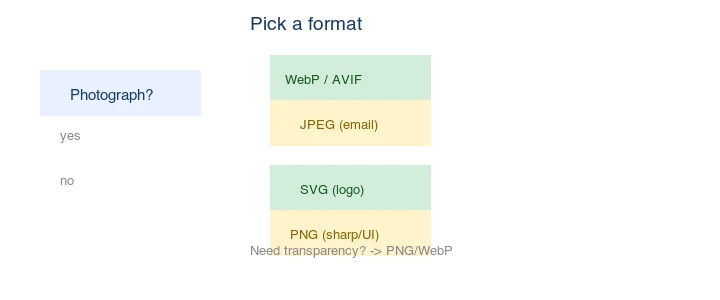
- Is it a photograph? → WebP/AVIF (with JPEG fallback).
- Does it need transparency? → PNG or WebP (alpha).
- Is it a logo/icon/illustration that scales? → SVG.
- Is it sharp text/UI? → PNG.
- Is it an animation? → Animated WebP/AVIF, not GIF.
- Is it for email? → JPEG or PNG (no WebP/AVIF).
For almost every web photograph the answer is now "WebP or AVIF with a JPEG fallback." JPEG remains only because of universal compatibility, not because it is the best choice.
How do you serve multiple formats?
Use the <picture> element so each browser gets the best format it supports:
<picture>
  <source srcset="/img/photo.avif" type="image/avif">
  <source srcset="/img/photo.webp" type="image/webp">
  <img src="/img/photo.jpg" alt="Description" width="800" height="600" loading="lazy">
</picture>
The browser picks the first type it supports and ignores the rest. Always keep a real <img> with a JPEG src as the final fallback. See the image format guide on MDN for the current per-browser support table.
Common mistakes
- Using PNG for photographs. It works but the file is 8–19× larger than necessary.
- Using JPEG for text or logos. Compression blurs sharp edges. Use PNG or SVG.
- Serving one format with no fallback. AVIF/WebP need a JPEG fallback for old clients.
- Animating with GIF. Animated WebP/AVIF are far smaller and support more colors.
- Ignoring SVG for logos. A rasterized logo is blurry at high-DPI; SVG stays sharp at any size.
Frequently asked questions
Which image format should I use?
JPEG for photographs, PNG for graphics with sharp edges or transparency, WebP as the modern web default (smaller than both), AVIF for the smallest photos on modern browsers, and SVG for logos and icons. Match the format to the content.
Is WebP better than JPEG?
For web delivery, yes — WebP is 25 to 35 percent smaller at equal quality and is supported in all current browsers. Keep JPEG as a fallback only for very old browsers. See the WebP converter guide.
When should I use AVIF?
When you can encode it and your audience is mostly on modern browsers — AVIF is roughly 50 percent smaller than JPEG. The trade-off is slower encoding and gaps on older browsers. Ship AVIF with a WebP fallback through a <picture> element.
Does PNG support transparency?
Yes — PNG has a full alpha channel, which is why it is the format for graphics and logos with transparency. JPEG does not support transparency. WebP and AVIF also support alpha, at smaller sizes for web delivery.
Which format is smallest for photos?
AVIF (smallest on modern browsers), then WebP, then JPEG. PNG is largest for photos because it is lossless. For web delivery, WebP is the safe default; AVIF when you can encode it and your audience is on modern browsers.
What is the smallest image format?
AVIF for photos on modern browsers (roughly 50 percent smaller than JPEG), then WebP. PNG is largest for photos because it is lossless. For graphics with transparency, WebP or AVIF beat PNG. Match the format to the content and the browser support of your audience.
What is the difference between lossy and lossless?
Lossless (PNG, lossless WebP) preserves every pixel exactly and reverses perfectly — no quality is lost. Lossy (JPEG, lossy WebP, AVIF) discards detail the eye notices least to shrink the file, and the loss is permanent. Lossy wins on size for photos; lossless wins on quality for graphics, text, and masters you will re-edit. Pick by content.
What is the smallest format for graphics with transparency?
WebP or AVIF, both of which support an alpha channel and compress far smaller than PNG. For logos and icons on modern browsers, WebP or AVIF cut the file size dramatically versus PNG while keeping the transparency. Serve them with a PNG fallback through a <picture> element for older browsers that lack support.
Image credits
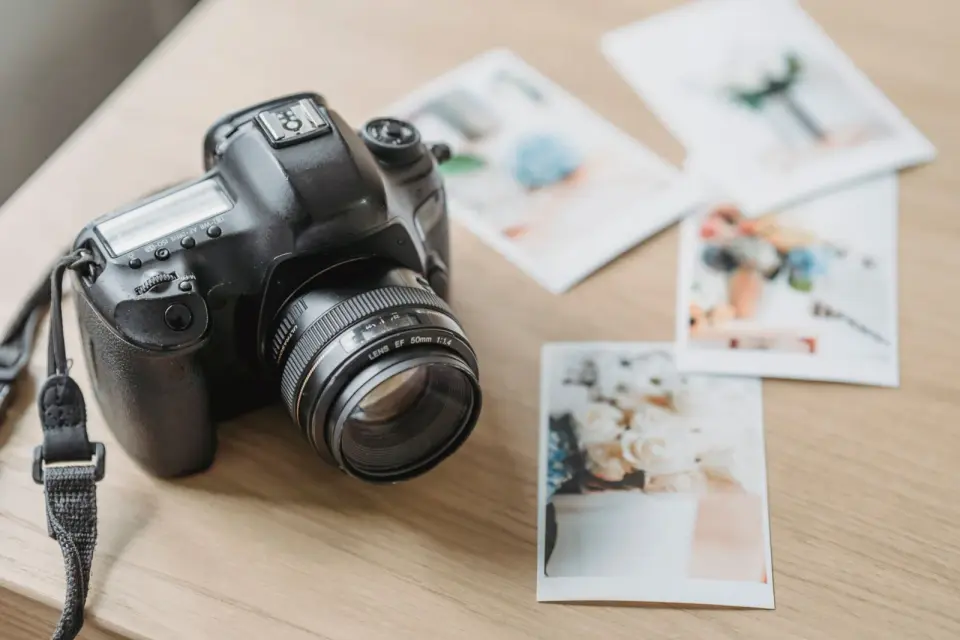
- Format size comparison and bar chart — generated by the author from an ecommerce-style photograph (Pexels #16675632, photo by Mikael Blomkvist) to show real measured file sizes across PNG, JPEG, WebP, and AVIF.
Use the free tools while you follow the guide.
Keep reading
2026-09-10
Image Blurry After Export? 7 Fixes That Target the Cause
Fix an image blurry after export by checking pixels, compression and upload changes. See measured examples, PNG vs JPEG choices, and seven practical fixes.

2026-08-01
Image Compression in 2026: WebP, AVIF, JPEG XL & JPEG AI Benchmarked
I benchmarked WebP, AVIF, and JPEG XL on 4 real photos. WebP saves 32% vs JPEG, AVIF 65%, JPEG XL 30%. Full data, browser support, and which format to pick in 2026.

2026-07-26
Image Optimization Checklist: Every Step for Fast Web Images
A complete image optimization checklist: format choice, resizing, compression, responsive delivery, lazy loading, and CDN setup. Run through it before every publish.