2026-10-27
Favicon Not Showing in Google? 8 Causes and How to Fix Each
Why Google still shows a blank globe or your old icon, and how to fix it: the home page tag, size and format rules, blocked crawling, and how long updates take.
Last updated: October 27, 2026. The requirements below are taken from Google Search Central's favicon documentation (last updated August 28, 2026). The checks were run with curl against imagic-ai.com.
Your new icon shows in the browser tab, yet Google still shows a grey globe, a builder's default logo, or the icon you replaced months ago. That gap is normal. A browser reads the icon from whatever page you open. Google reads it from one place, your home page, and only refreshes it when it recrawls that page.
Most cases come down to one of eight causes. Each one takes a minute to check, and the fixes are simple. The slow part is waiting for Google to pick the change up.
Quick answer: why isn't my favicon showing in Google?
Check these in order. The first three cover most cases:
- The tag is not on the home page. Google reads the
<link rel="icon">from your home page only. - The file is not square, or is too small. Google needs a 1:1 image of at least 8x8 px and recommends larger than 48x48 px.
- Google has not recrawled yet. Google says recrawling takes "several days to several weeks".
If those three are fine, check the rest:
- The format is not on Google's list. Supported formats are BMP, GIF, ICO, PNG, JPEG, PPM and TIFF. SVG is not listed.
- Crawling is blocked. Googlebot must reach the home page and Googlebot-Image must reach the icon file.
- The icon URL keeps changing. Google asks for a stable URL.
- Your home page lives in a subdirectory.
example.com/shopis not supported as a favicon home page. - Google judged the image inappropriate. It then shows a default icon instead.
Use the table below to find the fix fast:
| Symptom | Most likely cause | Fix |
|---|---|---|
| Grey globe, never had an icon in results | Tag missing from home page, or file blocked | Add the tag to the home page, check robots.txt |
| Old icon still showing after a change | Google has not recrawled | Request indexing of the home page, then wait |
| Icon shows in Chrome but not in Google | SVG only, or tag only on inner pages | Add an ICO or PNG version on the home page |
| Shows on some subdomains, not others | One favicon per hostname | Add the tag to each subdomain's home page |
| Platform logo (builder default) shows | Builder's site icon setting is empty | Upload a square icon in the site settings |
How does Google choose the favicon it shows?
Use the home page as your only target. Google's documentation describes a three-step process: create a favicon that meets the guidelines, add a <link> tag to the header of your home page, then wait for Google to recrawl it.
A minimal tag looks like this:
<link rel="icon" href="/favicon.ico" sizes="any">
Google accepts four rel values: icon, shortcut icon (kept "for historical reasons"), apple-touch-icon and apple-touch-icon-precomposed. The href can be relative or absolute, and Google says the file "doesn't need to be hosted on your site", so an icon on a CDN is fine.
Three scoping rules catch people out:
- One favicon per hostname.
www.example.comandshop.example.comcan each have their own. - Subdirectories share the host's icon.
example.com/blogcannot have a different favicon in results. - Subdirectory home pages are not supported. If your site's home is
example.com/store, Google will not take the favicon from there.
Is your favicon the right size and shape?
Pick a square. Google requires a 1:1 aspect ratio and a minimum of 8x8 px, and recommends going above 48x48 px. Google does not publish a maximum, but anything above 512 px only adds bytes.
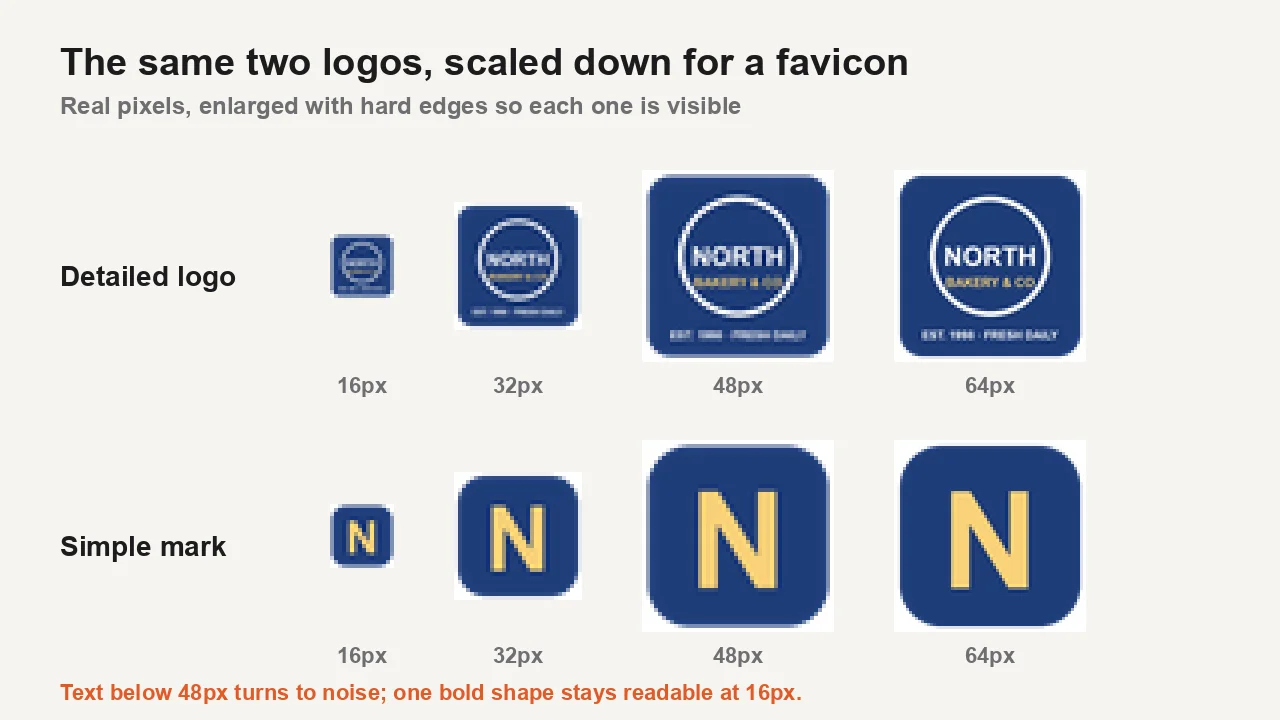
Size is only half of it. The icon in a search result is tiny, so detail disappears. In the figure above, a badge logo with three lines of text turns to noise below 48 px, while a single bold letter stays readable at 16 px. If your full logo is busy, use the simplest piece of it: a letter, a symbol, or the logo's main shape.
A wide wordmark is the other trap. You cannot simply stretch it into a square, and a centre crop cuts the letters off:
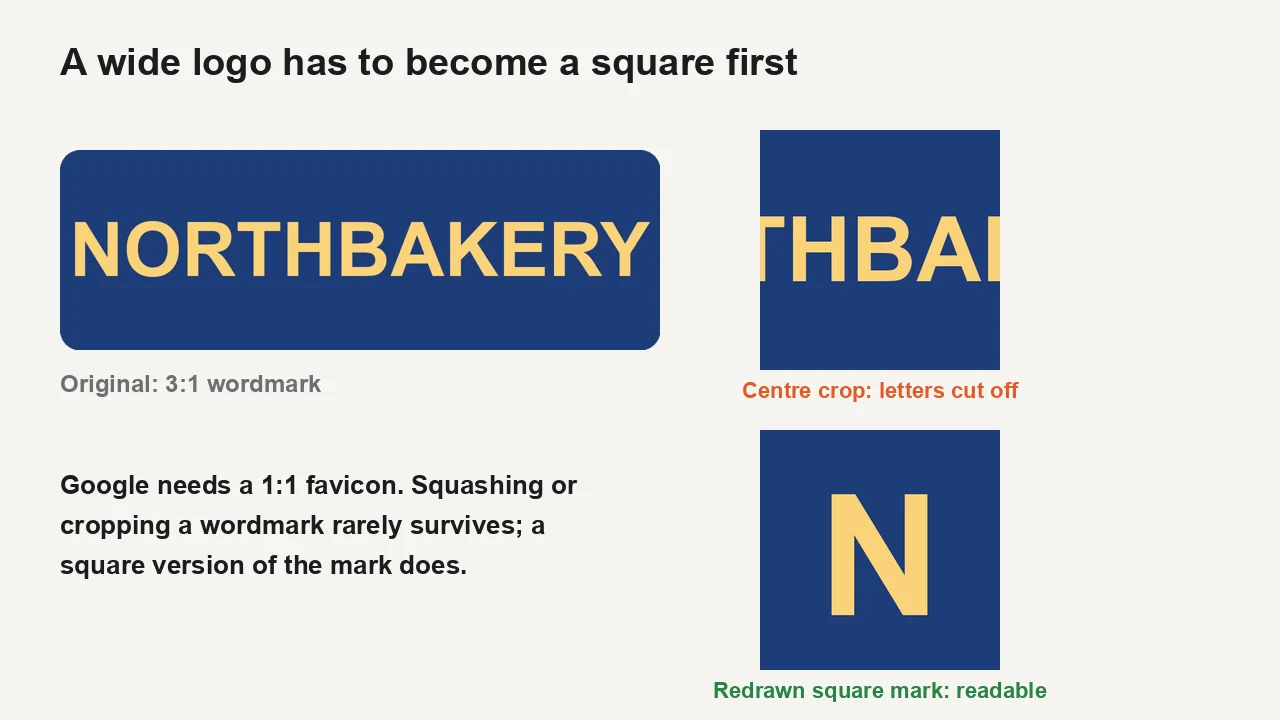
Start from a square source and the rest is easy. Crop it with the image cropper if needed, then run it through the favicon converter. That tool centre-crops to a square and packs 16, 32, 48, 64, 128 and 256 px versions into one favicon.ico, in your browser.
Which file format does Google accept?
Use ICO or PNG for the file Google reads. The supported list is BMP, GIF, ICO, PNG, JPEG, PPM and TIFF.
SVG is missing from that list. Modern browsers display an SVG favicon happily, which is why an SVG-only site can show its icon in every tab and still get a blank globe in Google. Keep the SVG if you like it, and add a raster version next to it:
<link rel="icon" href="/favicon.ico" sizes="any">
<link rel="icon" href="/favicon.svg" type="image/svg+xml">
<link rel="apple-touch-icon" href="/apple-touch-icon.png">
If you only have the SVG, convert it with the SVG to PNG converter and then make the ICO from that PNG.
| Format | Shows in browser tabs | Accepted by Google Search | Notes |
|---|---|---|---|
| ICO | Yes | Yes | One file can hold several sizes |
| PNG | Yes | Yes | Simple, well supported |
| SVG | Yes (modern browsers) | Not listed | Add an ICO or PNG next to it |
| JPEG | Yes | Yes | No transparency; corners stay filled |
| GIF, BMP, TIFF, PPM | Varies | Yes | Rarely worth using |
Can Google actually fetch your favicon?
Check crawling next. Google states that "Googlebot-Image must be able to crawl the favicon file and Googlebot must be able to crawl the home page." A Disallow that covers the icon's folder, a login wall, or a firewall rule that blocks bots will all hide the icon.
Run these checks from a terminal:
- Fetch the home page HTML and confirm the tag is there:
curl -s https://example.com/ | grep -i 'rel="icon'. - Fetch the icon and confirm a 200 with an image content type:
curl -sI https://example.com/favicon.ico. - Read robots.txt and make sure no rule covers the icon path or the home page.
- Use Search Console's URL Inspection on the home page and run a live test to see what Googlebot receives.
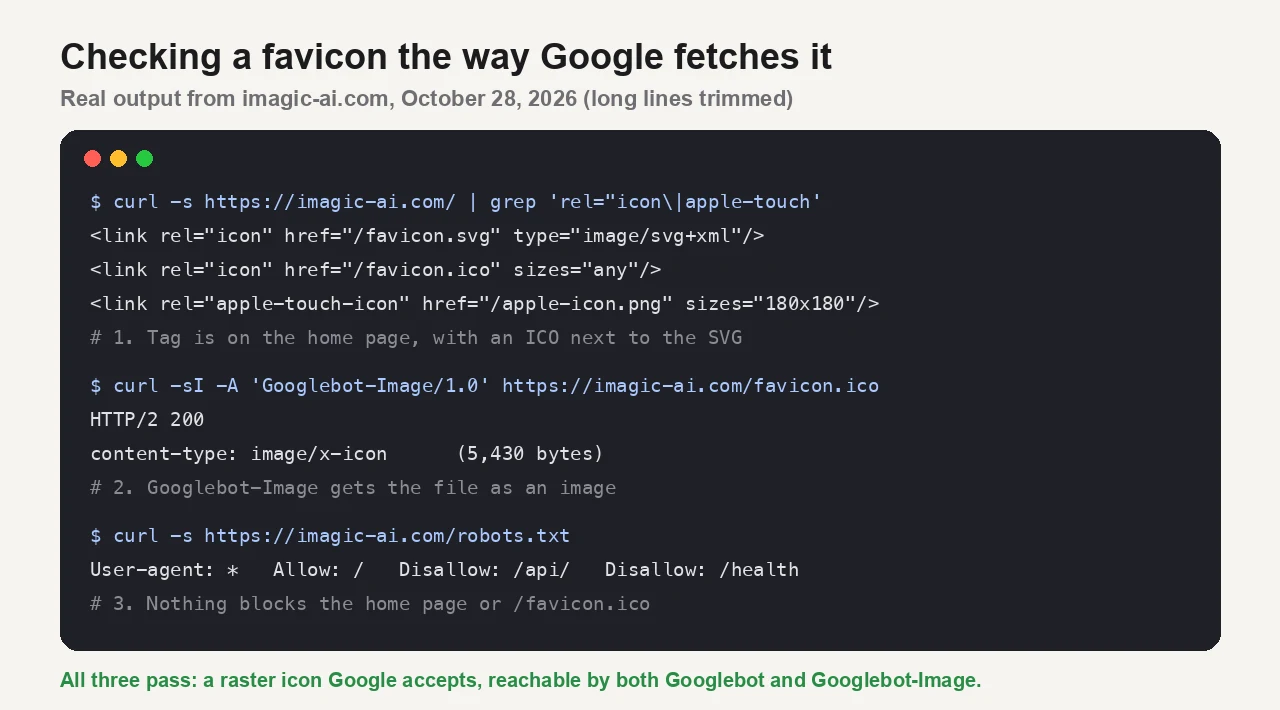
When I ran the first three checks on imagic-ai.com, the home page declared an ICO, an SVG and an apple-touch-icon. /favicon.ico returned 200 as image/x-icon (5,430 bytes) when requested with a Googlebot-Image user agent. robots.txt disallows only /api/ and /health. That combination is what you are aiming for: a raster icon Google accepts, reachable by both crawlers.
Why does Google still show your old favicon?
Start by accepting the wait. Google says crawling "can take anywhere from several days to several weeks", depending on how often its systems decide your content needs refreshing. Nothing on your side forces an instant update.
You can nudge it:
- Request indexing of the home page with the URL Inspection tool in Search Console. This is the step Google itself points to in its favicon guide.
- Keep the icon URL stable. Google asks you not to change the favicon URL frequently. Replacing the file at the same URL is fine; renaming it on every deploy is not.
- Do not stack redirects. If
/favicon.icoredirects to a new location, make sure the final URL returns an image with a 200.
Your own browser is a separate cache. If your tab still shows the old icon, open the site in a private window. That tells you nothing about Google, though: the search result updates on Google's schedule, not your browser's.
What if your site builder controls the favicon?
Check the generated home page, not the settings screen. Site builders and themes usually have a "site icon" or "favicon" field, and they write the <link> tag for you. When the field is empty, some platforms show their own default icon instead, which is why a few sites appear in results with the host's logo.
Upload a square PNG of at least 48x48 px in that setting, publish, and then view the home page source to confirm a rel="icon" tag points at your file. If the builder only accepts one size, give it 512x512 px and let it scale down.
What does Google refuse to show?
Google will not display a favicon it "deems inappropriate, including pornography or hate symbols", and replaces it with a default icon. Google also asks that the icon be "visually representative of your website's brand". Even when every guideline is met, Google notes that a favicon "isn't guaranteed to appear". If you have checked everything above and waited several weeks, Google offers a feedback form linked from its favicon documentation.
Key takeaway
Put a square ICO or PNG on your home page with a rel="icon" tag, make sure Googlebot and Googlebot-Image can reach both, keep the URL stable, request indexing, and give it a few weeks. The full rules are in Google's favicon guidelines for Search, and the recrawl steps are in Ask Google to recrawl your URLs.
To make the file itself, the favicon converter builds a multi-size ICO in your browser, and the favicon design guide covers sizes, dark mode and the HTML tags in more depth.
Frequently asked questions
How long does it take for a new favicon to show in Google?
Google says crawling can take from several days to several weeks. Requesting indexing of your home page in Search Console can speed it up, but there is no instant update.
Why does my favicon show in Chrome but not in Google?
Chrome reads the icon from any page and supports SVG. Google reads it from the home page only and does not list SVG as a supported format. Add an ICO or PNG tag on the home page.
What size should a favicon be for Google?
Square, at least 8x8 px, and Google recommends larger than 48x48 px. A multi-size ICO with 16 to 256 px versions covers both browsers and search.
Can I use an SVG favicon for Google Search?
SVG is not on Google's supported list. Keep the SVG for browsers if you want, but add an ICO or PNG version on the home page as well.
Does each subdomain need its own favicon?
Yes. Google allows one favicon per hostname, so blog.example.com uses the tag on its own home page. Subdirectories such as example.com/blog share the main site's icon.
Why does Google show a default globe icon for my site?
Either Google found no usable favicon on your home page, could not crawl it, or replaced it because it did not meet the guidelines. Work through the checklist above, then request indexing.
Image credits
Cover photo: Firmbee.com (laptop on a wooden table), from Pexels under the Pexels license. The two logo figures were drawn for this article and scaled the way the favicon converter does it: centre square crop, then resize. The terminal figure shows real curl output from imagic-ai.com on October 28, 2026.
Use the free tools while you follow the guide.
Keep reading
2026-10-28
WhatsApp Image Sizes: 1600px, 1080×1920 and the 16MB Limit
WhatsApp compresses every photo. I tested profile photos, status, and shared images, then found the document trick that skips compression and keeps full resolution.
2026-09-13
16-Bit Depth Maps: Fix Banding and Verify Your PNG
Fix stair-stepped or inverted depth maps with a reproducible 8-bit vs 16-bit PNG test, a file inspection script, and a practical Blender import checklist.
2026-09-13
GIF Maker From Images: Build Animated GIFs That Load Fast
Turn a set of images into an animated GIF for web and social media. Real frame timing, size limits for each platform, and when to choose GIF over video.