2026-03-22 · Updated 2026-07-26
How Image Compression Works: JPEG, PNG, and WebP Explained
A technical walkthrough of how image compression works: chroma subsampling, DCT, quantization, PNG filtering, and where each format wins, with practical quality settings.
Last updated: July 26, 2026
Image compression shrinks files by removing information your eye is bad at seeing. Understanding which information each format throws away tells you why JPEG blurs text, why PNG stays large, and why WebP and AVIF win on photographs. This is a practitioner's walkthrough of the actual algorithms, not a marketing comparison.
Quick answer: how does image compression work?
Every web image format does two jobs: predict pixel values so repeated data collapses, then encode the prediction errors efficiently. Lossy formats (JPEG, WebP lossy, AVIF) also quantize — they round off high-frequency detail that humans barely perceive. Lossless formats (PNG, WebP lossless) skip quantization and keep every pixel.
The practical decision:
| Image content | Best format | Why |
|---|---|---|
| Photographs, complex gradients | WebP/AVIF lossy | Smallest bytes, eye hides the loss |
| Sharp text, UI, line art, logos | PNG or WebP lossless | Quantization would blur edges |
| Full-color photos needing edits later | PNG (or keep RAW/JPEG master) | Avoid repeated lossy re-encodes |
| Maximum compatibility | JPEG | Decodes everywhere, but largest |
Read the AVIF vs WebP vs JPEG comparison for the format decision; this article focuses on what happens inside each encoder.
What is the difference between lossy and lossless?
Lossless compression reconstructs the original pixel-for-pixel. It works by finding redundancy: runs of identical color, repeated patterns, predictable gradients. PNG, GIF, and WebP-lossless use this approach. The ceiling is the entropy of the image — random noise barely compresses at all.
Lossy compression discards information permanently. The trick is to discard the information your visual system notices least: fine high-frequency texture and subtle color differences. JPEG, WebP-lossy, and AVIF do this. The payoff is far smaller files — often 5–10× smaller than lossless for photographs.
The formats use specific techniques:
| Technique | Used by | What it does |
|---|---|---|
| Chroma subsampling | JPEG, WebP, AVIF | Drops color resolution; eyes are less sensitive to color than brightness |
| Discrete Cosine Transform (DCT) | JPEG, AVIF | Converts 8×8 blocks to frequencies so detail can be selectively dropped |
| Predictive filtering | PNG, WebP lossless | Guesses each pixel from neighbors; encodes only the error |
| LZ77 + Huffman (DEFLATE) | PNG | Compresses repeated byte sequences with short codes |
| Intra-frame prediction | AVIF, WebP lossy | Borrows block prediction from video codecs for better guesses |
How does JPEG compression actually work?
JPEG is the canonical lossy pipeline. Five stages run in order:
| Stage | What happens |
|---|---|
| 1. Color space conversion | RGB becomes YCbCr — one luma (brightness, Y) and two chroma (color) channels. |
| 2. Chroma subsampling | Chroma is downsampled, typically to 4:2:0. Eyes read brightness more sharply than color, so this halves the data with little perceived loss. |
| 3. DCT | Each channel is split into 8×8 blocks; a Discrete Cosine Transform turns each block into frequency coefficients (smooth areas in one corner, detail/edges in the other). |
| 4. Quantization | Coefficients are divided by a matrix. High frequencies get large divisors and many round to zero. This is the lossy step — the quality slider scales this matrix. |
| 5. Entropy coding | Quantized coefficients are zigzag-ordered, run-length encoded (long zero runs compress hard), then Huffman-coded into the final JPEG bytes. |
The reason JPEG blurs text and sharp edges: high-frequency coefficients carry edges, and quantization zeroes them out. Crank quality low enough and you see 8×8 blocking artifacts.
You can see quantization at work on a single feather-detail crop. The same 500×280 region, encoded at three quality levels, shows exactly what the quality slider trades away:
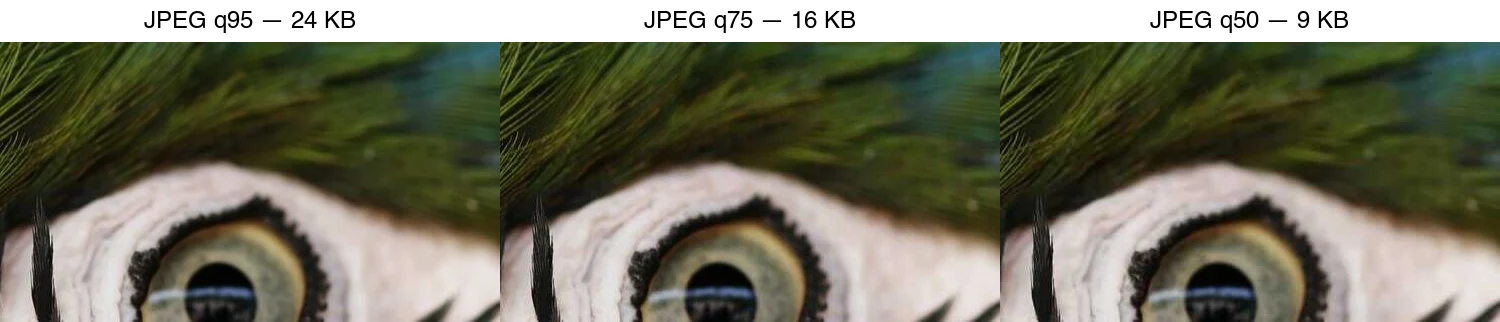
At q95 the feather barbs stay distinct. By q75 the fine strands begin to blur together. At q50 the 8×8 blocks are clearly visible and texture is smeared — the file is smaller, but the loss is now something a viewer notices.
How does PNG compression work?
PNG is lossless and works completely differently. Two stages:
- Row filtering. Before compression, each scanline is filtered to make it more predictable. PNG defines five filters (None, Sub, Up, Average, Paeth); the encoder picks the best per row.
| Filter | Predicts each pixel from… | Works well on… |
|---|---|---|
| None | Nothing (raw) | Already-random data |
| Sub | The pixel to the left | Horizontal gradients |
| Up | The pixel above | Vertical patterns |
| Average | Left and above, averaged | Smooth gradients |
| Paeth | A linear prediction of left/above/upper-left | Complex, edge-heavy art |
- DEFLATE compression. The filtered bytes go through LZ77 (find repeated sequences, replace with back-references) plus Huffman coding (short codes for common values) — the same algorithm ZIP uses.
PNG optimization tips that actually help:
- Use PNG-8 (indexed, ≤256 colors) for flat graphics — far smaller than PNG-24.
- Strip unneeded chunks: EXIF, unused ICC profiles, the alpha channel if the image is opaque.
- Re-compress with
optipngorpngquant(the latter converts to 8-bit with dithering for large savings on photographs that must stay PNG).
Why is WebP smaller than both?
WebP has two independent modes:
- Lossy WebP borrows from the VP8 video codec. It uses block prediction across the whole frame (not just within 8×8 blocks like JPEG), 4×4 and 8×8 transforms, and better arithmetic entropy coding. The result is roughly 25–34% smaller than JPEG at matched quality.
- Lossless WebP uses up to 13 prediction modes, a color-space transform to decorrelate channels, and an LZ77 variant. It is typically ~20–26% smaller than PNG for the same content.
AVIF goes further by using the AV1 video codec's intra-frame tools, beating WebP lossy by another 20–30%. The cost is encoding speed — AVIF is slow to produce. See the TinyPNG alternatives guide for tools that output WebP and AVIF.
How do you measure compression quality?
Two metrics dominate. Neither is perfect; use both.
| Metric | What it measures | Rough interpretation |
|---|---|---|
| PSNR (Peak Signal-to-Noise Ratio) | Mathematical pixel difference, in dB | >40 dB: excellent · 30–40: acceptable · <30: visible loss |
| SSIM (Structural Similarity Index) | Perceptual structural similarity, 0–1 | >0.95: near-identical · 0.90–0.95: good · <0.90: visible |
PSNR is easy to compute but ignores what humans notice; SSIM correlates better with perception but still underrates artifacts that distract (ringing near text). For real product decisions, eyeball the result at intended display size rather than trusting a single number.
The Mozilla JPEG quality study and Google's WebP compression study publish methodology and sample images if you want to reproduce comparisons.
What quality settings should you use?
Start from these defaults, then tune for your content. These are guidelines, not laws.
| Use case | Format | Starting quality | Target size |
|---|---|---|---|
| Hero / LCP image | WebP or AVIF | 75–80 | <200 KB |
| Product photo | WebP or AVIF | 80–85 | <100 KB |
| Thumbnail | WebP | 70–75 | <30 KB |
| Logo / icon | PNG or SVG | lossless | <10 KB |
| Text-heavy screenshot | PNG | lossless | (varies) |
Two rules that matter more than the number:
- Compare at matched visual quality, not matched quality numbers. AVIF q60, WebP q75, and JPEG q85 look roughly similar. Comparing all three at "q80" is meaningless.
- Resize before compressing. A 4000px camera original compressed to JPEG q80 is still a 4000px download. Downscale to the display size first — that saves more bytes than any quality tweak.
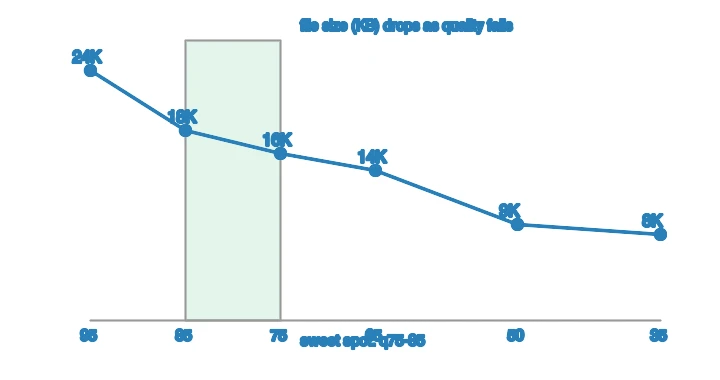
The size-versus-quality curve shows why the 75–85 band is the usual recommendation. On the same feather-detail crop, file size falls steeply at first, then flattens — and the visible quality drop accelerates below q75. Pushing past that point saves little bytes but costs real detail:
How do you compress images well in practice?
- Start from the right master. Shoot RAW or high-quality JPEG; compression compounds, so avoid re-encoding a file that is already lossy.
- Resize first. Match the on-page box with the Image Resizer before any other step.
- Pick format by content. Photograph → WebP/AVIF lossy; text/UI → PNG or WebP lossless.
- Encode at a sensible quality. Start at 75–80 for photos in the Image Compressor.
- Strip metadata for the public web (keep EXIF for archives); the Image Converter does format + metadata in one pass.
- Inspect at display size and serve a
<picture>fallback so old clients get JPEG.
Common mistakes
- Re-compressing already-compressed JPEGs. Each lossy encode adds artifacts. Keep a master.
- Ignoring chroma subsampling for text. 4:2:0 is fine for photos but smears colored text. Use 4:4:4 (or PNG) for text-heavy graphics.
- Trusting one quality number across formats. The number means different things in JPEG, WebP, and AVIF.
- Optimizing before resizing. Always resize first — it is the single biggest byte saving.
- Serving AVIF/WebP without a JPEG fallback. Old browsers and email clients render nothing.
Related guides
- AVIF vs WebP vs JPEG: Which Format Should You Use?
- Compress Images Without Losing Quality
- TinyPNG Alternatives Compared
- Image SEO Optimization Checklist
- Complete Image Optimization Checklist
Frequently asked questions
How does image compression work?
Lossless compression (PNG) finds and encodes repeating patterns without changing pixels. Lossy compression (JPEG, WebP) discards high-frequency detail the eye notices least, then encodes the rest. The quality setting controls how much lossy compression discards.
What is the difference between lossy and lossless?
Lossless preserves every pixel exactly and reverses perfectly (PNG, lossless WebP). Lossy discards detail to shrink the file and cannot reverse (JPEG, lossy WebP). Lossy wins on size for photos; lossless wins on quality for graphics and masters.
Which format compresses photos best?
AVIF (smallest, modern browsers), then WebP, then JPEG. PNG is largest for photos because it is lossless. For web delivery, WebP is the safe default; AVIF when you can encode it and your audience is on modern browsers.
Does compression reduce quality?
Lossy does, but at quality 80–85 the loss is invisible at viewing size. The trap is re-compressing a lossy file repeatedly (generation loss), which compounds artifacts. Compress once from a lossless master.
Image credits
- Cover — Source code on a monitor, photo by Leonid Altman on Pexels (converted to WebP).
- JPEG quality ladder and size-versus-quality curve — generated by the author from a macaw-feather photograph (Pexels #36720663, photo by Kaca Skok) to show real measured JPEG output across quality levels.
Use the free tools while you follow the guide.
Keep reading
2026-09-10
Image Blurry After Export? 7 Fixes That Target the Cause
Fix an image blurry after export by checking pixels, compression and upload changes. See measured examples, PNG vs JPEG choices, and seven practical fixes.
2026-08-01
Image Compression in 2026: WebP, AVIF, JPEG XL & JPEG AI Benchmarked
I benchmarked WebP, AVIF, and JPEG XL on 4 real photos. WebP saves 32% vs JPEG, AVIF 65%, JPEG XL 30%. Full data, browser support, and which format to pick in 2026.
2026-07-26
Image Optimization Checklist: Every Step for Fast Web Images
A complete image optimization checklist: format choice, resizing, compression, responsive delivery, lazy loading, and CDN setup. Run through it before every publish.