2026-03-22 · Updated 2026-07-26
Social Media Image Sizes: The Complete Cheat Sheet (2026)
Every social media image size in one cheat sheet: Instagram, Facebook, Twitter/X, YouTube, Pinterest, and LinkedIn, with aspect ratios and where to verify the numbers.
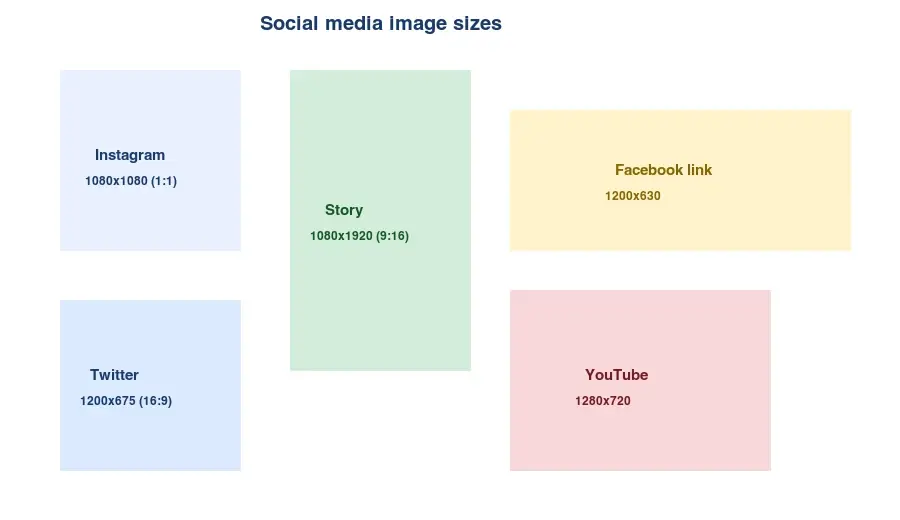
Last updated: July 26, 2026
Social platforms each want images at specific dimensions and aspect ratios, and the numbers change over time. This is the reference cheat sheet: the current widely-used sizes for Instagram, Facebook, Twitter/X, YouTube, Pinterest, and LinkedIn, with feed versus story formats. The rule that matters most: always verify on the platform's own media page before a big campaign, because these numbers shift.
Quick answer: what size should I use?
| Platform | Image | Size (px) | Aspect |
|---|---|---|---|
| Feed post (square) | 1080×1080 | 1:1 | |
| Story / Reel cover | 1080×1920 | 9:16 | |
| Landscape post | 1080×566 | 1.91:1 | |
| Link preview | 1200×630 | 1.91:1 | |
| Feed photo | 1200×1200 | 1:1 | |
| Twitter/X | Post image | 1200×675 | 16:9 |
| Twitter/X | Header | 1500×500 | 3:1 |
| YouTube | Thumbnail | 1280×720 | 16:9 |
| Standard pin | 1000×1500 | 2:3 | |
| Shared image | 1200×627 | 1.91:1 |
For the workflow of producing these from one master, see how to batch resize.
What aspect ratio does each format use?
Most formats fall into three aspect-ratio buckets. Knowing which one a format wants is faster than memorizing pixel counts:
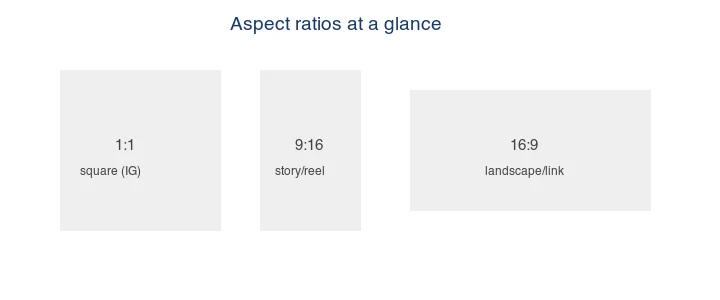
- 1:1 (square) — Instagram feed, Facebook feed.
- 9:16 (portrait) — Instagram/Facebook stories, Reels, TikTok.
- 16:9 / 1.91:1 (landscape) — Twitter posts, Facebook/Twitter link previews, YouTube thumbnails.
- 2:3 (portrait) — Pinterest pins.
Instagram image sizes
| Format | Size | Aspect |
|---|---|---|
| Square feed post | 1080×1080 | 1:1 |
| Portrait feed post | 1080×1350 | 4:5 |
| Landscape feed post | 1080×566 | 1.91:1 |
| Story / Reel cover | 1080×1920 | 9:16 |
| Profile photo | 320×320 | 1:1 |
Instagram displays feed posts at varying crops; the safe zone for text is the center square. Stories and Reels are 9:16 — keep important content away from the top and bottom edges, where the profile icon and caption overlays sit.
Facebook image sizes
| Format | Size | Aspect |
|---|---|---|
| Link preview | 1200×630 | 1.91:1 |
| Feed photo | 1200×1200 | 1:1 |
| Cover photo | 820×312 | ~2.6:1 |
| Story | 1080×1920 | 9:16 |
| Profile photo | 320×320 | 1:1 |
The link-preview 1200×630 also works for LinkedIn and Twitter shared images, which is why it is the most reusable single size.
Twitter/X image sizes
| Format | Size | Aspect |
|---|---|---|
| Post image | 1200×675 | 16:9 |
| Header | 1500×500 | 3:1 |
| Profile photo | 400×400 | 1:1 |
Twitter crops images to 16:9 in the feed on some devices; keep the subject centered.
YouTube image sizes
| Format | Size | Aspect |
|---|---|---|
| Thumbnail | 1280×720 | 16:9 |
| Channel banner | 2560×1440 | 16:9 (safe area smaller) |
| Profile photo | 800×800 | 1:1 |
Thumbnails must be under 2 MB and are the single biggest driver of click-through, so design for clarity and legibility at small sizes — a thumbnail is often viewed at a fraction of its full size.
Pinterest and LinkedIn
| Platform | Format | Size | Aspect |
|---|---|---|---|
| Standard pin | 1000×1500 | 2:3 | |
| Square pin | 1000×1000 | 1:1 | |
| Shared image | 1200×627 | 1.91:1 | |
| Cover | 1128×191 | ~5.9:1 |
Pinterest favors tall (2:3) pins in the feed; square pins work but get less vertical space.
Where do I verify the current numbers?
Platforms update these specs. Always check their official media pages before a campaign:
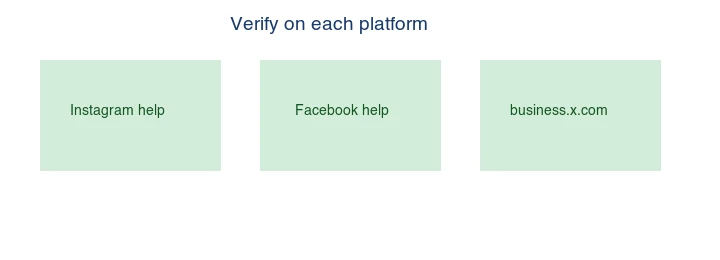
- Instagram: help.instagram.com
- Facebook: facebook.com/help
- Twitter/X: business.x.com
- YouTube: Google support
- LinkedIn: linkedin.com/help
This guide's numbers are widely-used defaults as of 2026, but a platform can change a spec any time, so treat the official page as authoritative.
How do you produce every size from one photo?
Shoot or design a master at the largest format (e.g. 1080×1920 for a story), then derive each size:
- Square — crop the center.
- Landscape — crop top and bottom (or letterbox).
- Portrait pin — crop sides.
Use the Image Resizer to generate each variant, and how to batch resize for the batch workflow. Design the master with a safe central zone so every crop keeps the subject.
The reason to design a safe central zone is that every platform crops differently, and a layout that looks perfect at 1:1 may lose its headline when cropped to 9:16 or 16:9. A common professional workflow is to build the master on a 1080×1920 canvas with all key content (subject, headline, logo) inside the central 1080×1080 square — that way the same master crops cleanly to square, story, and landscape without redesigning each one. This "design once, crop many" approach is what lets a small team produce a full week of multi-platform posts from one shoot, and it is the single biggest time-saver in social image production.
Common mistakes
- Using one size for every platform. Crops badly; produce per-format variants.
- Putting text near the edges. Crops and overlays cut it off. Keep text in the center safe zone.
- Trust the numbers forever. Platforms change specs; verify before a big campaign.
- Too-low resolution. A 400px image looks soft on retina screens. Export at the listed pixel sizes.
- Forgetting the profile/header sizes. They are separate from feed posts and often neglected.
Frequently asked questions
What is the best single image size for all platforms?
1200×630 (1.91:1) covers Facebook, Twitter, and LinkedIn shared images. For Instagram you still need a square (1080×1080) and a story (1080×1920). One size does not cover every platform — produce per-format variants.
What size is an Instagram story?
1080×1920 pixels (9:16). Keep important content out of the top and bottom ~250px, where the profile icon and caption overlays sit. The safe zone is the center.
Do social media image sizes change?
Yes — platforms update specs over time. Verify on the platform's official media page before a campaign. Instagram at help.instagram.com, Facebook at facebook.com/help.
How do you produce every size from one photo?
Design a master at the largest format, then crop variants — keep a central safe zone so every crop keeps the subject. See the resize guide for the workflow.
How do I verify the current sizes?
Check each platform's official media page before a campaign — Instagram at help.instagram.com, Facebook at facebook.com/help. Platforms change specs, so treat the official page as authoritative.
What resolution should social images be?
The pixel dimensions listed in this guide are the export sizes, and they are already retina-appropriate — do not upscale beyond them, because platforms re-encode uploads anyway and oversized files waste bytes. Export at the listed sizes, keep each file under roughly 1 MB, and the platform's re-encode stays clean.
What is the safe zone for a story?
The center. Stories (1080×1920, 9:16) overlay UI at the top (profile icon, progress bar) and bottom (caption, link sticker), so keep the subject and any text in the central region — roughly 250px from the top and bottom. Content in the overlay zones gets covered or tapped accidentally. Design to the safe zone, not the full canvas.
What aspect ratio is an Instagram Reel?
9:16 (1080×1920), the same as a story. The Reel cover and thumbnail also use 9:16, with the safe zone in the center to avoid the UI overlays top and bottom. Shoot or design in portrait 9:16 for Reels, the same as for stories, so your vertical content works across both formats.
What size is a Twitter/X post image?
1200×675 pixels (16:9). Twitter crops some images to 16:9 in the feed on certain devices, so keep the subject centered and out of the extreme edges. The header is a separate 1500×500 (3:1). Matching these sizes avoids the platform re-cropping your image into an awkward frame.
What size is a Pinterest pin?
1000×1500 pixels (2:3) for a standard pin — Pinterest favors tall pins because they take more vertical space in the feed and earn more clicks. Square pins (1000×1000) work but get less feed space. Design in 2:3 for the best reach, and keep text and the subject in the upper portion where Pinterest overlays the title.
Image credits
- Size-templates, aspect-ratio-reference, and where-to-verify diagrams — generated by the author as labeled reference figures showing the standard social media dimensions and aspect ratios.
Use the free tools while you follow the guide.
Keep reading
2026-07-26
How to Batch Resize Images: Free Tools and Scripts Compared
Resize hundreds of images at once with free online tools, ImageMagick, XnConvert, and Python scripts. Copy-paste commands, preset sizes, and a practical workflow.
2026-07-26
Bulk Image Resizer: Resize Hundreds of Images at Once (Free)
Resize hundreds of images in bulk for free with a browser tool, ImageMagick, XnConvert, or a Python script, with real byte savings and the safe batch workflow.
2026-07-26
How to Crop an Image to a Circle (Profile Photos and Avatars)
Crop an image to a circle for avatars and profile photos: the square-first rule, making a transparent circle PNG or a circle on a background, and where circles are used.