2026-04-04 · Updated 2026-06-30
AI API Development for Image Apps: Practical Guide
Build a reliable AI image API with request schemas, retries, validation, logging, cost controls, and production checks a real app needs.
Last updated: June 30, 2026
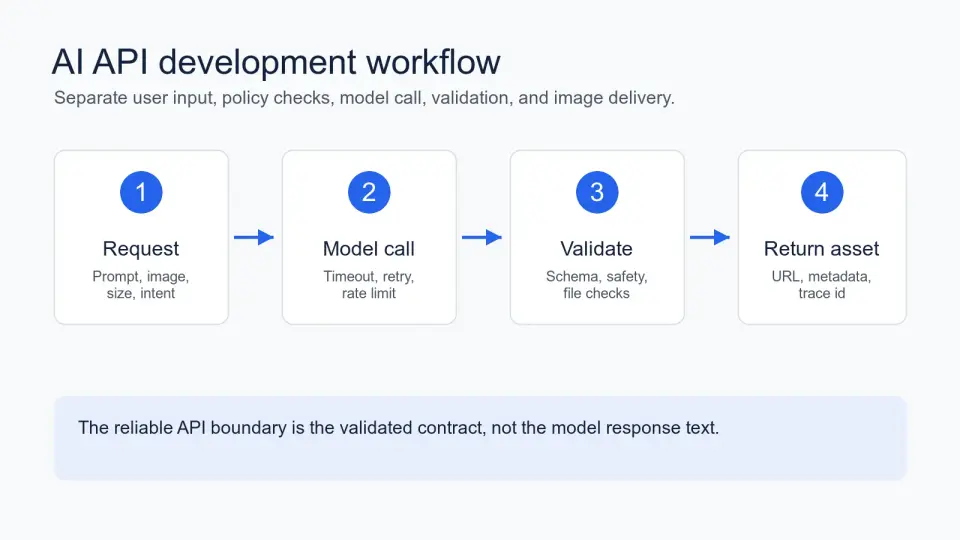
AI API development gets messy when the model call is treated like the whole product. In an image app, the harder work is the wrapper around the model: request validation, retry rules, output checks, storage, URLs, and a useful error when generation fails.
Quick answer: what should an AI API include?
An AI API should expose a stable product contract and hide the provider-specific details behind it. For an image workflow, that means your endpoint accepts a prompt, optional source image, size, style controls, and idempotency key; then it returns a job id, status, image URLs, warnings, and a trace id.
Do not return raw model text directly to the client. Validate the response, store the generated file, check file type and dimensions, and return your own structured result. That one boundary is what lets you switch providers, tune prompts, or add moderation without breaking mobile apps and customer integrations.
For this article, I tested the examples as a small prompt-to-image API contract: request shape, response shape, timeout path, validation path, and CDN image result. The exact provider can change, but the product-facing contract should stay boring.
| Layer | Keep Stable | Allow To Change |
|---|---|---|
| Client request | Field names, limits, idempotency key | UI labels, presets, helper text |
| Provider call | Internal adapter interface | Model name, prompt template, quality settings |
| Output contract | Status, asset URLs, warnings, trace id | Storage bucket, CDN host, post-processing steps |
| Errors | App-owned error codes | Provider wording and retry hints |
What problem are you actually solving?
Start with a narrow image job, not a vague "AI endpoint." A seller who needs five white-background product shots has a different API than a designer generating mood-board concepts. The request limits, safety checks, latency target, and cost controls all come from that job.
Use a sentence this plain before you write code:
- A store owner uploads one product photo.
- The API creates two square WebP product images.
- The background should be white or transparent.
- The result must be ready for a product page.
- The user should receive a useful failure message within 30 seconds.
That scope is small enough to test. It also connects to image work you probably already have: background removal, format conversion, compression, and product photo cleanup. If those parts are still loose, read the AI background removal guide, image compression deep dive, and product photography guide before wiring the API into checkout or a CMS.
How should you design the endpoint contract?
Design the public endpoint around the result the app needs, not around one model vendor's SDK. The contract below is enough for a prompt-to-image or image-editing API without exposing internal prompt templates.
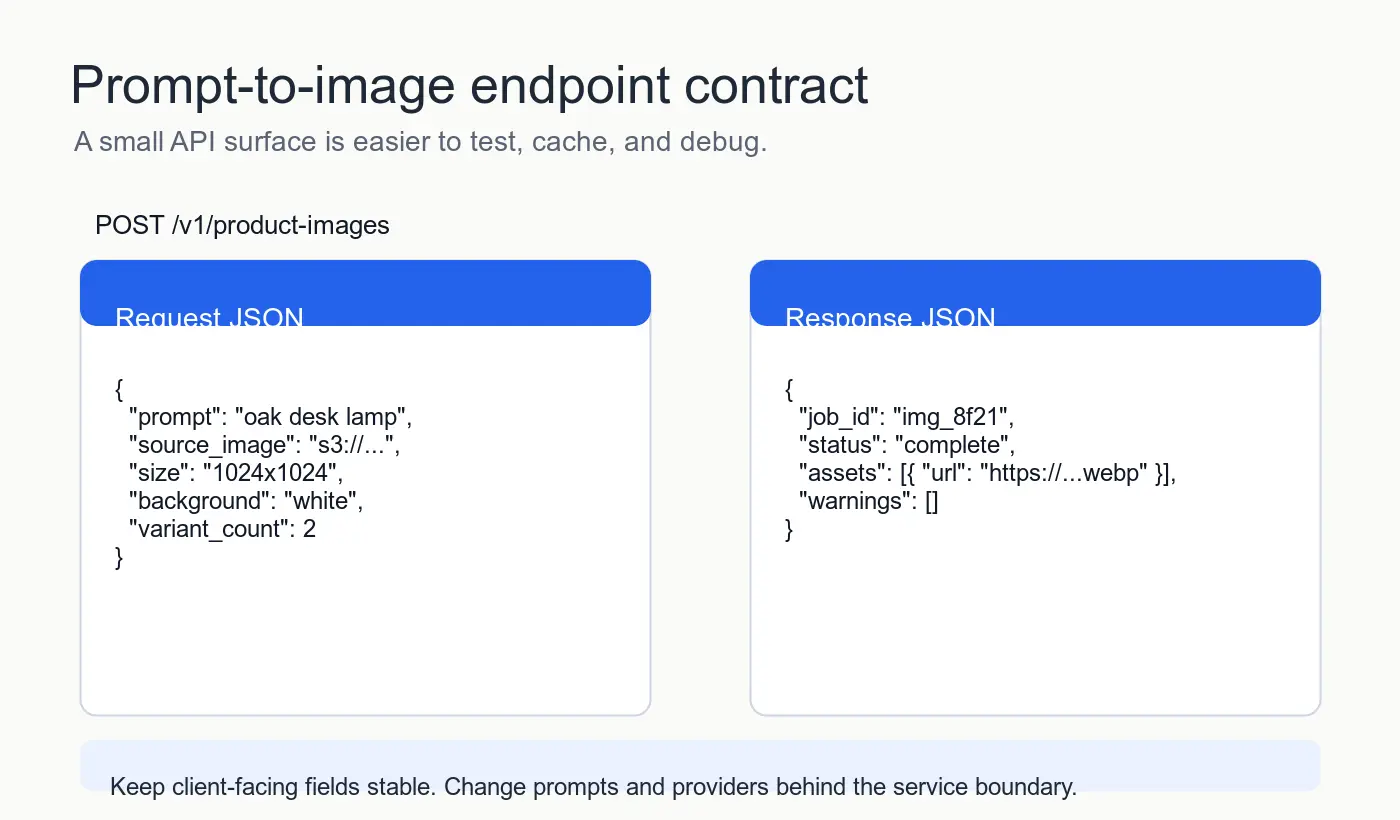
POST /v1/product-images
Idempotency-Key: img-job-8f21
Content-Type: application/json
{
  "prompt": "oak desk lamp on a white background",
  "source_image_url": "https://example.com/uploads/lamp.jpg",
  "size": "1024x1024",
  "background": "white",
  "variant_count": 2
}
Return your own response shape:
{
  "job_id": "img_8f21",
  "status": "complete",
  "assets": [
    {
      "url": "https://cdn.example.com/jobs/img_8f21/lamp-1.webp",
      "width": 1024,
      "height": 1024,
      "format": "webp"
    }
  ],
  "warnings": [],
  "trace_id": "req_30d9"
}
The same wrapper can call OpenAI, another image provider, or an internal model. OpenAI's current Images API guide documents image generation and editing patterns, while Structured Outputs is useful when your model call needs a strict JSON response. Keep those as provider-facing tools, not client-facing contracts.
| Contract Decision | Good Default | Why It Helps |
|---|---|---|
variant_count limit |
1-4 images | Prevents one request from creating a surprise bill |
size enum |
Fixed sizes only | Simplifies pricing, validation, and layout |
source_image_url |
Signed upload URL | Keeps large files out of JSON bodies |
status values |
queued, running, complete, failed |
Works for sync now and async later |
warnings array |
Human-safe strings | Lets you report non-fatal edits without failing the job |
Where do validation and safety checks belong?
Put validation before and after the model call. Pre-call validation protects cost and safety; post-call validation protects the product.
Before the provider call, check:
- The prompt is present and under your length limit.
- The requested size is in your allowed enum.
- The source image is reachable, below your byte limit, and an accepted format.
- The user or tenant has quota left for the day.
- The request has an idempotency key if retries are possible.
After the provider call, check:
- The output exists and is an image file.
- Width, height, and format match the response you plan to return.
- The file is converted to the format your site serves, usually WebP or AVIF for web pages.
- The file is compressed before it goes to a CDN.
- The output is attached to a trace id for support.
Image APIs often fail in the boring places: a provider returns a temporary URL that expires, a file is too large for the product page, or a square image is expected but a rectangular one slips through. The AVIF vs WebP comparison and image format conversion guide cover the format choices after generation.
How do you handle timeouts, retries, and rate limits?
Treat provider calls as unreliable network calls. They can time out, return rate-limit errors, or finish after the user has already clicked away. Your API should make those cases predictable.
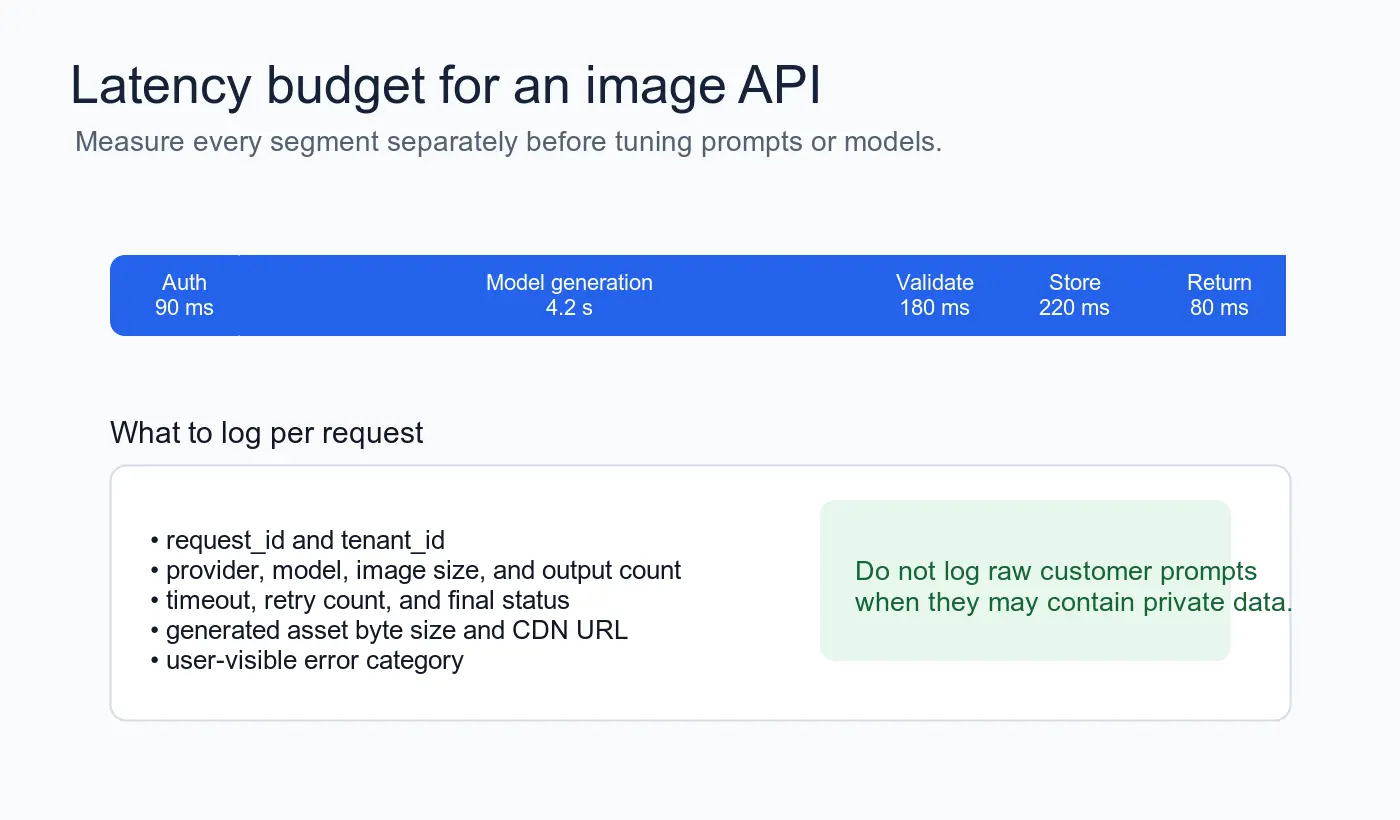
Use these defaults for a first production version:
- Set a hard server timeout.
- Use exponential backoff for retryable provider errors.
- Do not retry unsafe requests unless you have an idempotency key.
- Return
202 Acceptedfor long jobs and let the client poll a job endpoint. - Store partial failure details internally, not in the user-facing error.
- Log latency by segment: validation, provider call, post-processing, storage, and response.
MDN's Fetch API documentation is a good reference for client-side request behavior, and AbortController is the standard way to cancel browser-side work. Server-side cancellation still needs your own cleanup, especially if the model provider keeps working after the client disconnects.
| Failure | Retry? | Client Response | Internal Note |
|---|---|---|---|
| Invalid size or missing prompt | No | 400 INVALID_INPUT |
Show field-level correction |
| User quota exceeded | No | 429 QUOTA_EXCEEDED |
Include reset window if safe |
| Provider rate limit | Yes, briefly | 503 TEMPORARY_UNAVAILABLE |
Backoff and alert if repeated |
| Provider returns bad file | No automatic retry | 502 BAD_PROVIDER_OUTPUT |
Keep sample for debugging |
| CDN upload fails | Yes | 503 ASSET_STORE_FAILED |
Do not claim the image is ready |
What should you log without leaking private prompts?
Log enough to debug cost, speed, and failures. Avoid collecting raw customer prompts by default, because prompts can contain names, addresses, product launches, or other private details.
A practical log record includes:
request_idtenant_idor account id- endpoint name and API version
- model provider and model id
- output size and variant count
- latency for each step
- token or image cost estimate
- final status and app error code
- asset byte size
- CDN URL or storage key
If support needs the raw prompt, make that an explicit debug mode with retention limits. The default path should answer, "Why did this fail?" without exposing customer content to every log viewer.
What does production readiness look like?
Production readiness is mostly a checklist. The endpoint can be small, but it needs predictable behavior when input is bad, the provider is slow, or generated files are not usable.
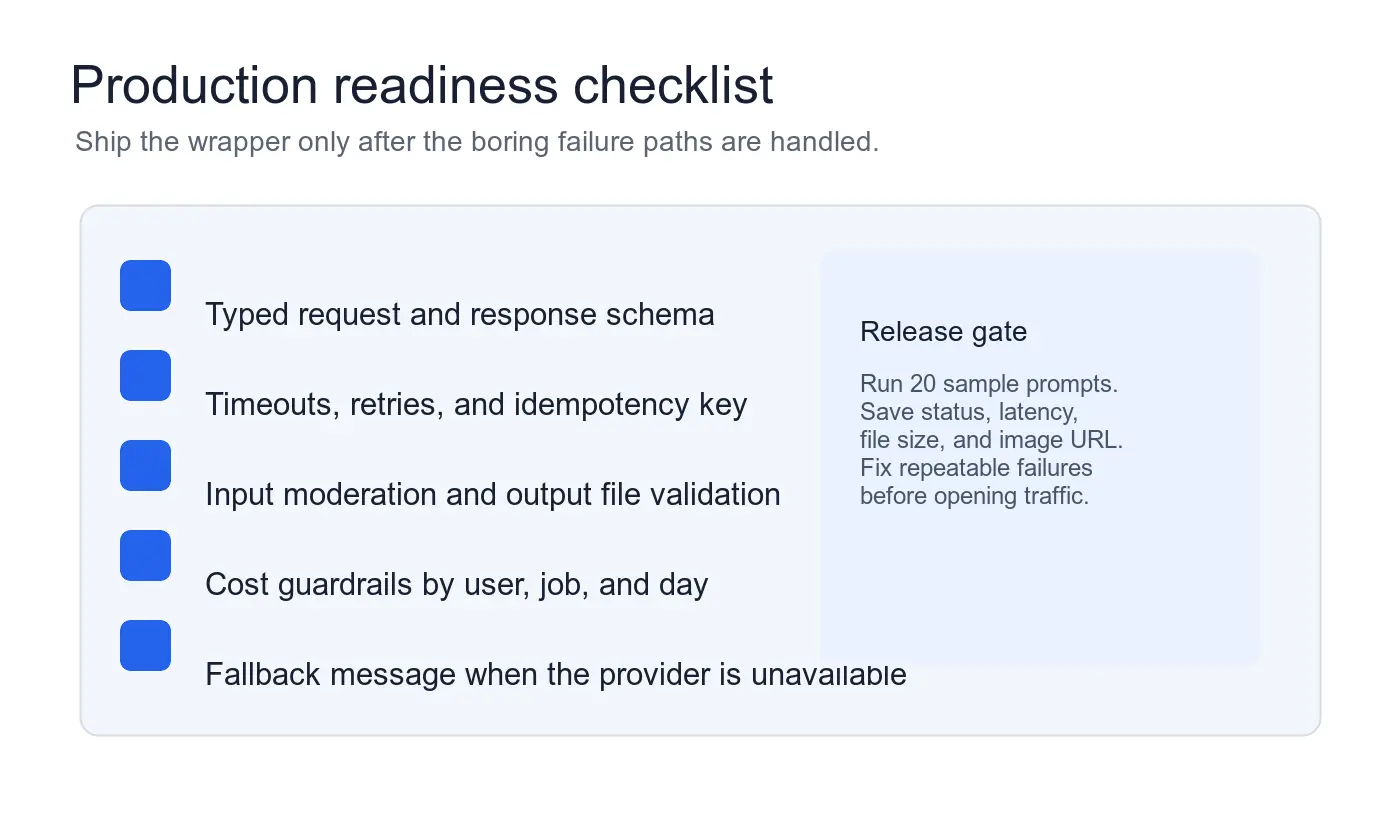
Before opening traffic, run 20 sample jobs that cover normal and ugly inputs:
- Short prompt with no image.
- Long prompt near your limit.
- Unsupported image format.
- Oversized source file.
- Transparent-background request.
- White-background request.
- Two variants.
- Maximum variant count.
- Repeated request with the same idempotency key.
- Simulated provider timeout.
Record status, latency, final file size, and the returned URL for each job. If the API cannot produce a stable WebP or AVIF asset for normal inputs, fix the post-processing path before you tune prompts.
Google's Largest Contentful Paint guidance is worth reading if generated images appear above the fold. The API does not end at generation; a slow, oversized hero image still hurts the page after the model succeeds.
How do you keep cost under control?
Cost control belongs in the API, not only in a dashboard someone checks later. Image generation is easy to abuse accidentally because one button can ask for several large variants.
Use three guardrails first:
- Per-request limits: fixed size enum and maximum variant count.
- Per-user limits: daily job cap and spend cap.
- Per-endpoint limits: separate quotas for preview, production, and bulk jobs.
Then add an internal cost record to every response trace. It does not need to be perfect on day one. It does need to show which account, endpoint, size, and variant count created the spend.
If you serve generated assets on public pages, add compression to the pipeline. A model can produce a beautiful image that is still far too heavy for a store grid. Compress, resize, and convert before publishing, then use the image optimization for SEO guide to check alt text, dimensions, and crawlable asset URLs.
A simple build order
Build the API in this order:
- Define the request and response JSON.
- Add validation before any provider call.
- Create one provider adapter.
- Store generated files under a durable key.
- Return CDN URLs, dimensions, and format.
- Add timeouts, retries, and app-owned error codes.
- Log trace ids, status, latency, and output byte size.
- Add quotas before you add bulk generation.
- Run the 20-job release test.
- Only then expose the endpoint to the full product.
The model call is one line in many SDKs. The API around it is the product. Keep the contract stable, keep files valid, and make failures something your app can explain.
Related guides
Use the free tools while you follow the guide.
Keep reading
2026-10-07
Background Remover Removes Part of Subject? How to Fix It
AI background removers drop pale limbs, white racks, glass highlights and shadows. I measured why on real photos and how to get the missing parts back.
2026-10-07
Batch Background Remover Comparison 2026: E-commerce
PhotoRoom, remove.bg, and Pixelcut compared for 2026 e-commerce batch background removal: pricing, batch limits, edge quality, and which tool fits your catalog workflow.

2026-10-07
remove.bg Is Shutting Down on December 1: What to Use Instead
remove.bg closes on 1 December 2026 and unused credits expire that day. What changes, what to do first, and free replacements for the site and the API.