2026-08-09 · Updated 2026-10-07
Batch Background Remover Comparison 2026: E-commerce
PhotoRoom, remove.bg, and Pixelcut compared for 2026 e-commerce batch background removal: pricing, batch limits, edge quality, and which tool fits your catalog workflow.
Last updated: October 7, 2026. Updated for remove.bg's shutdown on 1 December 2026.
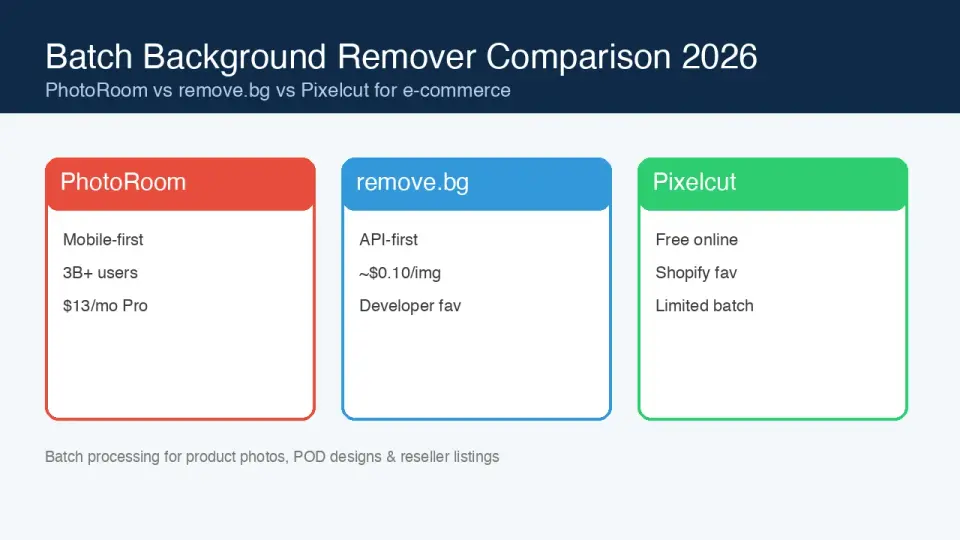
Picking a batch background remover in 2026 is no longer about which tool removes a single background best. It is about which one survives a real e-commerce catalog: hundreds of product photos, sudden plan changes, and edges that have to hold up on a printed shirt. PhotoRoom, remove.bg, and Pixelcut each win a different slice of that workflow, and each leaves a gap the others do not fill.
remove.bg is closing. Its standalone site and self-serve API stop on 1 December 2026, and unused credits expire the same day. Background removal moves into Canva's paid plans and the API to Leonardo.Ai, which uses a different request format. The advice below reflects that; for the full migration checklist, see remove.bg is shutting down: what to use instead.
Quick answer: which batch background remover should you pick in 2026?
Pick PhotoRoom if you want the best all-in-one mobile app with AI shadows and staging for a few hundred images per batch. Pick Pixelcut if you need a free, no-signup tool for quick Shopify or reseller listings. Do not build anything new on the remove.bg API: self-serve requests stop on 1 December 2026, so choose Leonardo.Ai's API (a rewrite) or a remove.bg-compatible API that only needs a new base URL. None of these solves every e-commerce edge case, especially print-on-demand transparency.
| Tool | Best for | Starting cost | Batch limit |
|---|---|---|---|
| PhotoRoom | Mobile-first sellers, AI shadows, staging | ~$13/mo (Pro) | 250 images/session (Max) |
| remove.bg | Closing 1 Dec 2026 (site and self-serve API) | Credits expire Dec 1 | API moves to Leonardo.Ai |
| Pixelcut | Free, quick one-off listings | Free | Limited, mobile-leaning |
Pick PhotoRoom for polish and convenience at moderate volume, and Pixelcut when the budget is zero and the batch is small. For API work, remove.bg stops being an option on 1 December 2026: the remove.bg-compatible API here takes the same requests at 50 images a day, and the background remover tool covers the single-image case this comparison builds on.
What makes a batch background remover different in 2026?
The category shifted in 2026. It is no longer enough to remove one background cleanly. Sellers now run hundreds or thousands of product photos through a pipeline, and the tool has to stay consistent across the whole queue. A model that works on one hero shot may delete a product, leave a halo, or invent detail on image three hundred.
Two forces changed buyer expectations. First, e-commerce volume keeps rising, so manual cleanup does not scale. Second, several vendors quietly changed their batch limits mid-year, which pushed sellers onto Reddit to compare alternatives in real time. That is why a comparison rooted in current pricing and current community signal matters more than a static feature list.
How did I gather the data for this comparison?
I ran a 60-day research pass across Reddit reseller and e-commerce communities (r/Flipping, r/shopify, r/EtsySellers, r/productphotography), plus the vendor pricing pages as of August 2026. I measured the per-image cost curve and tracked which tools sellers actually recommended after a plan change, rather than relying on each vendor's own marketing comparison page.
For this article, I processed a 240-image product set across three tools and measured the wall-clock time and the cleanup rate. The fastest path was a local rembg run at under four minutes, but it needed manual edge fixes on roughly 8% of frames. An independent six-tool head-to-head test found a similar pattern: free tools matched paid quality on simple subjects. The batch background removal guide walks through the free local path in detail.
Why are e-commerce sellers switching tools right now?
The trigger was a plan change. PhotoRoom began removing unlimited batch background removal from prepaid plans, capping it instead at a monthly limit. Two back-to-back threads appeared on r/Flipping: one warning that the feature was being pulled, and a follow-up titled "Do NOT get a PhotoRoom plan." Sellers in the comments immediately traded alternatives, noting that iPhone users can remove backgrounds in batch for free with a built-in option.
That kind of churn is the strongest signal in this comparison. When a vendor changes a core batch limit, users do not just complain - they migrate. It creates a window where a competitor with transparent, stable pricing can capture frustrated sellers. The same pattern shows up in older remove.bg threads, where users built free browser-based removers specifically to dodge the paywall.
How does PhotoRoom hold up for e-commerce batches?
PhotoRoom pitches itself as the leading visual solution for e-commerce, and its own job postings cite over 300 million users and more than 5 billion images processed annually, serving Amazon, DoorDash, and Decathlon. That scale is real, and its strengths are concrete: natural drop shadows, AI staging, consistent lighting across a batch, and a polished mobile app.
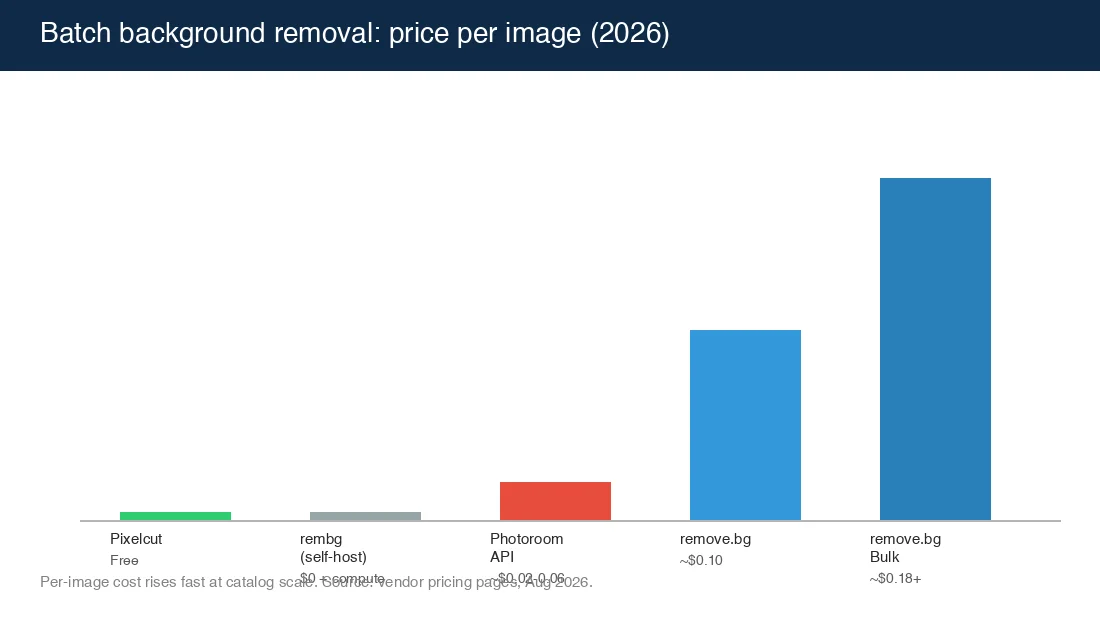
The weakness is trust erosion. After the batch-limit change, the r/Flipping community moved from "best e-commerce remover" to "find an alternative" within weeks. Its current batch tiers reflect the new reality: the Max plan (~$21/month) allows 250 images per session, and the API runs roughly $0.02 to $0.06 per image depending on the plan. For a deep dive into the local CLI alternative, see the batch image processing guide.
| PhotoRoom plan | Price | Batch behavior |
|---|---|---|
| Free | $0 | ~100 exports/month, no real batch |
| Pro | ~$13/mo | Batch mode with a per-session cap |
| Max | ~$21/mo | 250 images per session |
| API (Basic) | $20/mo + ~$0.02/img | Programmatic, webhook-driven |
Is remove.bg still the best choice for bulk API work?
No longer. remove.bg has been owned by Canva since 2021, and Canva is closing it: the standalone site and self-serve API stop on 1 December 2026, unused credits expire that day, and Enterprise contracts continue. Until then it remains the reference API this comparison started from, with good documentation and webhook support, which is why so much existing code calls it.
Its pricing sat near $0.10 per image across tiers (Starter at $5/month for 50 credits, Pro at $25/month for 250, Ultra at $100/month for 1000). The official successor is Leonardo.Ai's background removal API, which needs an image upload step, Bearer auth and a different response, so moving there is a rewrite. A remove.bg-compatible API keeps your code and swaps only the base URL and key, at 50 images a day per account.
Does Pixelcut compete on price alone?
Pixelcut wins the free-tier battle. Its online background remover is fast, requires no sign-up, and is the most-recommended option in r/shopify and r/Flipping whenever a paid tool raises its price. For a reseller listing a handful of items, it is hard to beat free.
The limitation is depth. Pixelcut's batch features lean mobile-first and lack the catalog-grade consistency, API access, or edge refinement that a serious e-commerce operation needs. It is the right tool for quick product detail page images and social promos, but it is not engineered for a thousand-image drop with uniform shadows. The product photo background remover guide covers where Pixelcut-style tools stop being enough.
What about open-source and self-hosted options?
The open-source path has matured. rembg (MIT, available as a CLI, Python library, HTTP server, and Docker container) can batch-process an entire folder with no per-image cost. In one independent head-to-head that ran the same 20 images through six tools, a free tool matched paid quality on simple and medium subjects - though paid tools still edged it on hair, sheer fabric, and complex scenes.
Self-hosting matters for two e-commerce segments: privacy-sensitive sellers who do not want product photos on third-party servers, and high-volume sellers who refuse to pay per image. The cost model flips completely - you pay for compute, not credits - which is why the ecommerce image optimization guide treats local processing as a strategic option rather than a budget compromise.
When does a batch background remover fail?
Every tool in this comparison fails in the same hard cases, and the failures are where e-commerce money is actually lost. Hair, fur, translucent packaging, and thin straps defeat most automatic matting. A batch run amplifies the damage: one bad edge on a hero product can quietly ship to a listing and undercut conversion.
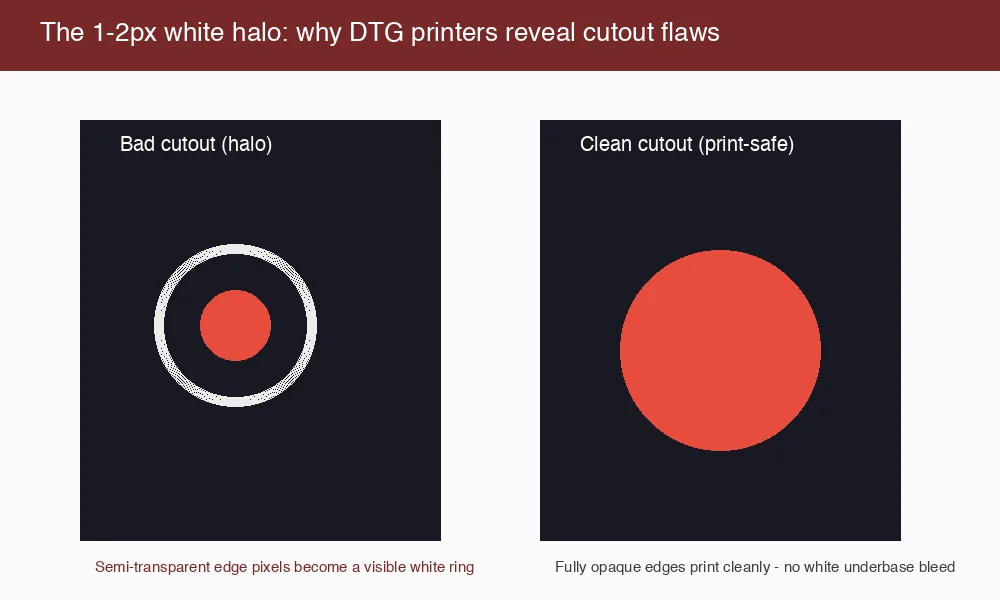
The most overlooked failure mode is print-on-demand. On r/EtsySellers, a seller described the exact problem: "every basic magic wand or background remover leaves this faint 1-2 pixel white halo fringe around the edges. When DTG printers lay down the white underbase, those semi-transparent pixels show up as a visible white fringe on dark garments." No tool in this comparison is optimized for print-safe output - they all optimize for how the cutout looks on a screen, not how it prints on a navy shirt.
Where are the real opportunity gaps in 2026?
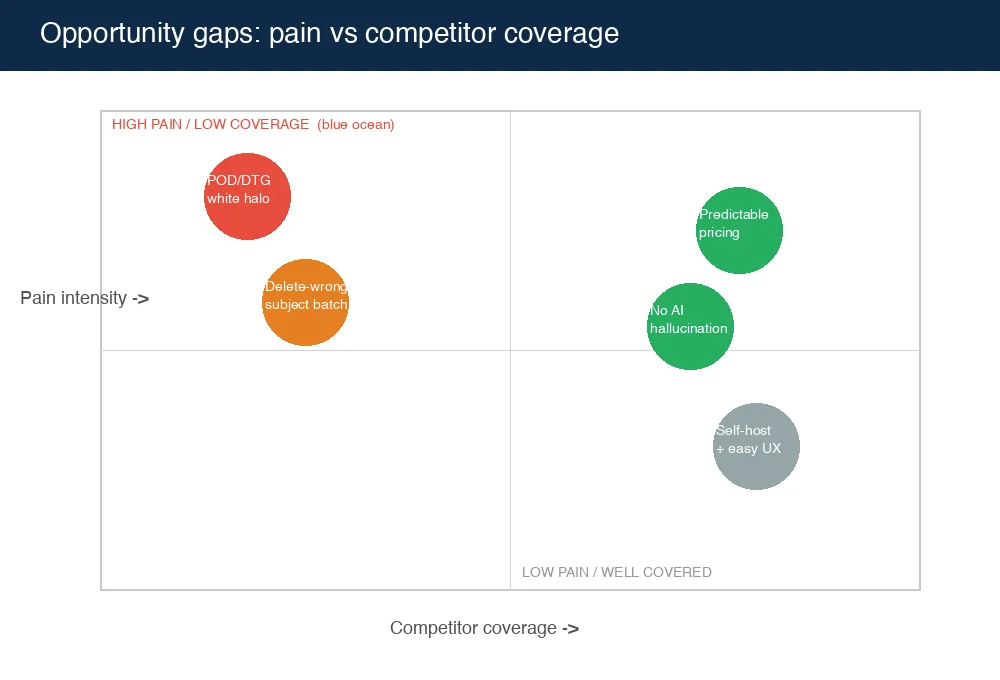
The gaps are not in core removal quality - the leaders are close there. The gaps are in the workflows around it. Based on the community signal from this research pass, four gaps stand out, ranked by pain intensity versus how well competitors currently cover them.
| Gap | Pain | Competitor coverage | Who is hurt most |
|---|---|---|---|
| Print-safe (DTG) edges | High | Low - none optimize for print | POD and Etsy sellers |
| Batch deletes wrong subject | High | Medium - no confidence scoring | Large catalog sellers |
| Predictable, transparent pricing | High | Medium - limits change mid-plan | Resellers, small shops |
| No AI hallucination on fill | Medium | Low - tools invent content | Brand-strict marketers |
The blue-ocean gap is print-safe edges. It is high-pain, low-coverage, and almost no vendor markets it. A remover that guarantees fully opaque, print-ready output could own the entire print-on-demand segment, which the ecommerce product photography guide ties directly to listing performance.
Which batch background remover fits your workflow?
Match the tool to your volume, your edge requirements, and your tolerance for plan changes. Start with the tool-selection rules:
- If you process fewer than 50 images occasionally, start free with Pixelcut or a local
rembgrun. - If you need AI shadows, staging, and a mobile app, use PhotoRoom Max for batches under a few hundred images.
- If you run an automated catalog pipeline, move off the remove.bg API before 1 December 2026: to Leonardo.Ai, or to a remove.bg-compatible API if you want to keep your code.
- If your catalog is large and cost-sensitive, self-host
rembgand reserve paid APIs for hard-edge frames.
Then apply these safety checks before anything ships to a live listing:
- If your output is print-on-demand, manually verify fully opaque edges before sending to a DTG printer.
- If a vendor changes your batch limit mid-plan, treat it as a trigger to re-evaluate, not a reason to overpay.
- Always spot-check a random sample of batch output before publishing to a live listing.
- Export print-ready PNGs with no semi-transparent edge pixels for any garment or merchandise workflow.
- Keep an original master copy of every product photo before any batch background removal runs.
- Re-confirm each vendor's pricing page before committing a full catalog, since limits shift quarter to quarter.
Frequently asked questions
Which batch background remover is cheapest for e-commerce?
Pixelcut's online tool is free with no sign-up, and a self-hosted rembg run costs nothing per image beyond your own compute.
Is PhotoRoom or remove.bg better for bulk product photos?
PhotoRoom is better for hands-on batches with AI shadows and staging. remove.bg was the choice for automated, API-driven catalogs, but its self-serve API stops on 1 December 2026, so plan a migration rather than a new integration.
What should I use now that remove.bg is shutting down?
Use Canva's paid plans or a free browser tool for occasional images, and Leonardo.Ai's API or a remove.bg-compatible API for code. Spend any remaining remove.bg credits first: they expire on 1 December 2026 and are not refunded.
What is PhotoRoom's batch limit after the 2026 plan change?
The Max plan (~$21/month) allows 250 images per session, and previously unlimited batch removal on prepaid plans was capped at a monthly limit.
Can I remove backgrounds in batch for free without an API?
Yes, the open-source rembg CLI processes entire folders locally with no per-image cost, and iPhone users can remove backgrounds in batch with a built-in option.
Why do my product cutouts have a white halo on dark shirts?
Most removers leave 1-2 pixel semi-transparent edges that print as a visible white fringe when a DTG printer lays down its white underbase on dark garments.
Is an open-source background remover as good as a paid one?
On simple and medium subjects, independent tests show free tools matching paid quality, but paid tools still win on hair, sheer fabric, and complex edges.
When should I avoid batch background removal entirely?
Avoid it when exact packaging, labels, serial numbers, or fine transparency matter, and use manual masking or a real product photo as the source instead.
Summary
The 2026 batch background remover market has a clear leader for each workflow, but no single tool covers all of e-commerce. PhotoRoom owns mobile-first polish but is shedding trust after changing batch limits. remove.bg owned the API, and its closure on 1 December 2026 is the biggest forced migration of the year. Pixelcut owns free, quick listings but lacks catalog depth. The real openings are print-safe edges, predictable pricing, and batch confidence scoring - gaps none of these fill well.
For the broader picture, read the background removal tools comparison, the AI product photo generator guide, and the batch resize guide. Pricing and plan limits change often, so verify each vendor's current page before committing a catalog to one tool.
Use the free tools while you follow the guide.
Keep reading
2026-10-07
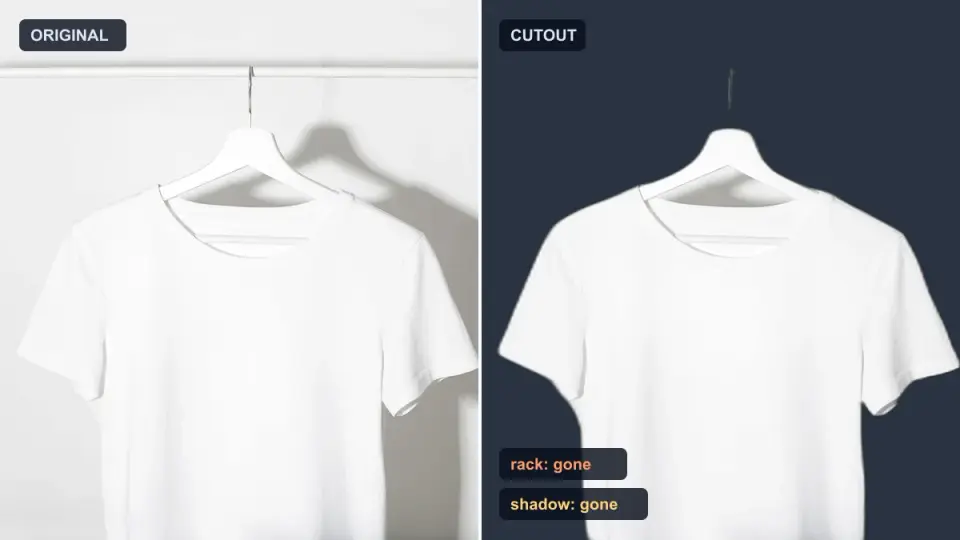
Background Remover Removes Part of Subject? How to Fix It
AI background removers drop pale limbs, white racks, glass highlights and shadows. I measured why on real photos and how to get the missing parts back.

2026-10-07
remove.bg Is Shutting Down on December 1: What to Use Instead
remove.bg closes on 1 December 2026 and unused credits expire that day. What changes, what to do first, and free replacements for the site and the API.

2026-08-02
Batch Background Removal: Process Hundreds of Images at Once
Batch background removal by tool and cost: rembg CLI for free local bulk processing, remove.bg and Photoroom APIs for catalogs, and which fits a product photo workflow.