2026-03-12 · Updated 2026-07-26
Real-ESRGAN AI Upscaling: How It Works and When to Use It
What Real-ESRGAN is, how its GAN-based super-resolution works, what it does well (4x upscaling of photos and art) and where it fails, with commands and honest limits.
Last updated: July 26, 2026
Real-ESRGAN is the open model behind most free "AI upscaler" tools: it enlarges images up to 4x while predicting plausible detail that classic resizing cannot. It is genuinely useful for rescuing low-resolution photos, old scans, and digital art — but it has real limits and failure modes. This guide explains how it works, what it does well, and when it is the wrong tool.
Quick answer: what is Real-ESRGAN for?
Use it to enlarge images 2–4x with recovered sharpness, when you cannot re-capture at higher resolution. Match the model to the content:
| Content | Model | Result |
|---|---|---|
| Photographs | realesrgan-x4plus |
Sharp 4x upscale, plausible texture |
| Anime / digital art | realesrgan-x4plus-anime |
Cleaner lines, less over-sharpening |
| Faces (close-up) | A face-specific model (GFPGAN/CodeFormer) | Avoids the "plastic skin" look |
| Text / documents | Not ideal | Tends to hallucinate strokes |
For one image, use the Image Upscaler; for batches, the Real-ESRGAN CLI. For the general upscaling decision, see how to upscale images.
How does Real-ESRGAN work?
Real-ESRGAN is a GAN-based super-resolution model. A generator network takes the low-resolution input and produces a 4x-larger output; discriminators judge whether the output looks like real high-resolution detail, and the generator learns from that feedback. "Real-" refers to its training on real-world degradations (blur, noise, compression artifacts), not just synthetic downsampling — which is why it handles JPEG artifacts and old photos better than earlier super-resolution models.
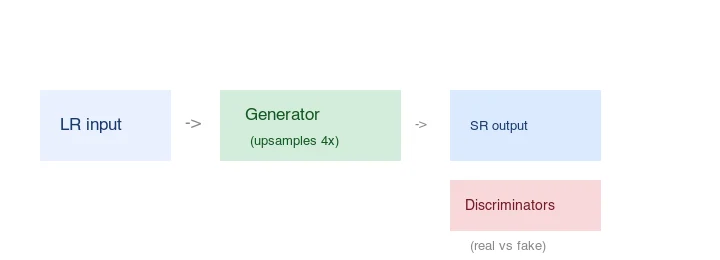 generator upsamples 4x -> super-resolution output, with discriminators judging real vs generated detail">
The Real-ESRGAN project on GitHub documents the architecture, models, and benchmarks. The key practical point: it predicts detail rather than recovering it — the output is a plausible guess, not the true high-resolution version of the input.
What is the difference from classic upscaling?
Classic resizing (Lanczos, bicubic) interpolates between existing pixels — it smooths but adds no new information. Real-ESRGAN's generator synthesizes new high-frequency detail (texture, edges) based on patterns it learned from training data. The result looks sharper than a Lanczos upscale of the same size, but the added detail is invented, not measured.
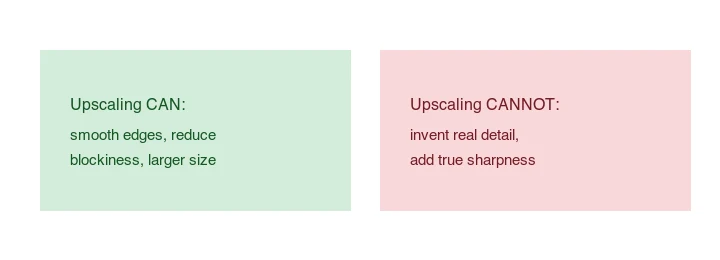
This distinction matters: a Real-ESRGAN output is sharper-looking but not more accurate. For evidence-sensitive uses (medical, forensic, archival), synthesized detail is a problem, not a feature.
How do the Real-ESRGAN models compare?
Each model is tuned for a content type. Picking the right one is the difference between a clean result and an over-processed one:
| Model | Best for | Trade-off |
|---|---|---|
realesrgan-x4plus |
General photographs, landscapes | Can over-smooth faces |
realesrgan-x4plus-anime |
Digital art, illustration, anime | Gentler, cleaner lines |
| GFPGAN / CodeFormer | Portraits and faces | Fixes the "plastic skin" issue |
realesr-animevideov3 |
Video frames, animation | Optimized for many sequential frames |
A common workflow for a portrait photo is to run the general model for the 4x enlargement, then pass the face region through GFPGAN/CodeFormer to restore natural skin texture. Combining models this way plays to each one's strength.
What are the practical use cases?
Real-ESRGAN earns its place in a few specific situations where a higher-resolution original is simply unavailable:
- Old family photos and scans. A 1-megapixel scan from a 1990s print enlarged to print or share clearly.
- Downloaded web images you must use. A small stock or client image that needs to fill a larger layout.
- Digital art and game assets. Scaling illustration and sprite art while keeping clean lines (the anime model excels here).
- Restoring compressed JPEGs. Real-ESRGAN was trained on real-world degradation, so it partly reverses JPEG blocking while upscaling.
- Video frames. Pulling a still from low-resolution video for a thumbnail or print.
In every case the honest framing is the same: it improves a low-res source, it does not turn it into a photo that was captured at high resolution. If you can re-shoot or find a higher-resolution master, do that instead — the convert RAW to JPG guide covers starting from a real high-resolution capture.
How do you run Real-ESRGAN?
The realesrgan-ncnn-vulkan CLI runs on CPU/GPU without a Python environment:
## 4x upscale of a photo
realesrgan-ncnn-vulkan -i input.jpg -o output.jpg -n realesrgan-x4plus

## Anime/digital art model (cleaner lines)
realesrgan-ncnn-vulkan -i input.png -o output.png -n realesrgan-x4plus-anime

## A folder
realesrgan-ncnn-vulkan -i input_dir -o output_dir -n realesrgan-x4plus
For Python integration, the realesrgan package wraps the model for use in pipelines. Both are open source under a permissive license.
When does Real-ESRGAN fail?
Knowing the failure modes saves you from trusting a bad output:
- "Plastic" skin on faces. The general model over-smooths skin into an unnatural texture. Use a face-specific model (GFPGAN/CodeFormer) for portraits.
- Hallucinated text. On documents, it invents stroke-like artifacts that look like text but are not. Do not use it for scanned documents.
- Over-sharpening. Pushed too far, output looks crunchy. The anime model is gentler; pick by content.
- Beyond 4x. Returns diminish fast; stacking 4x passes compounds artifacts. Re-capture if you need more.
- Already-large images. Upscaling a sharp 2000px photo adds little and wastes compute.
How does it compare to re-capturing?
Real-ESRGAN is a rescue tool, not a replacement for resolution. A photo captured at 3000px has real detail a 750px photo upscaled 4x can only guess at. If you control the capture — shoot at the resolution you need. Upscaling is for when the high-res original does not exist: old photos, downloaded images, client files that arrived small. See the convert RAW to JPG guide for starting from a high-resolution master.
Common mistakes
- Trusting the output as "true" resolution. It is plausible detail, not measured. Do not use it for evidence.
- Using the general model on faces. It produces plastic skin; use a face model.
- Upscaling beyond 4x. Diminishing returns and stacking artifacts.
- Upscaling already-sharp images. No benefit, wasted compute.
- Skipping the 100% check. Always inspect the result at full size; AI output can hide artifacts that look fine zoomed out.
Frequently asked questions
What is Real-ESRGAN for?
Upscaling low-resolution images (especially anime, illustrations, and photos) by 2x to 4x while synthesizing plausible detail. It is the go-to open model for AI upscaling. It recovers apparent detail that traditional resizing cannot.
How does Real-ESRGAN differ from classic upscaling?
Classic upscaling (bicubic) interpolates between existing pixels, which softens. Real-ESRGAN learned from low/high-resolution pairs, so it invents texture (skin, fabric, foliage) that looks real. The trade-off: it can hallucinate detail that was not there.
Which Real-ESRGAN model should I use?
The default (RealESRGAN_x4plus) for general photos, the anime model for illustrations, and a face-specific model when upscaling portraits. Pick by content type — the wrong model invents the wrong kind of detail.
When does Real-ESRGAN hurt?
On text, sharp graphics, and already-high-resolution images, where the invented texture distorts edges or adds unwanted artifacts. It is best on photographs and illustrations at 2x–4x. See the upscaling guide.
Is Real-ESRGAN free to use?
The model is open-source and free to run locally if you have the GPU. Hosted services charge per image. For batches, running locally is free; for one-offs, a hosted tool is convenient. See the upscaling guide.
What hardware do I need to run Real-ESRGAN?
A GPU with roughly 8 GB of VRAM for the standard model at 2x, more for 4x or very large images. Without a suitable GPU, use a hosted service that runs the model for you. CPU-only runs are possible but very slow. Match your hardware to the upscale ratio and image size you need.
Is Real-ESRGAN free?
The model is open-source and free to run locally if you have the GPU; hosted services charge per image. For batches, running locally is free; for one-offs, a hosted tool is convenient. See the upscaling guide.
How long does Real-ESRGAN take?
A few seconds per image for a 2x upscale on a decent GPU; longer for 4x, very large files, or CPU-only runs. It is not real-time for batches. Budget the time, or use a hosted service that handles the compute queue. The 2x default is the sweet spot for speed and quality.
Does Real-ESRGAN work on anime and illustrations?
Yes, and often better than on photos — there is a dedicated anime model tuned for the flat color and clean lines of illustrations, which produces sharper, more appropriate detail than the general model. For anime, manga, and digital illustrations, use the anime-specific model; for photographs, use the general one. The content type decides the right model.
Image credits
- Upscale before/after, ESRGAN architecture, and upscaling-limits diagrams — generated by the author from an ecommerce-style photograph (Pexels #16675632, photo by Mikael Blomkvist) to illustrate Real-ESRGAN's pipeline and limits.
Use the free tools while you follow the guide.
Keep reading
2026-07-28
How to Enhance Photo Quality: Sharpen, Denoise, and Brighten
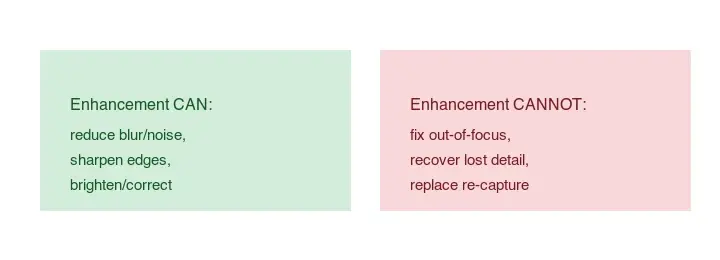
Enhance photo quality by sharpening, denoising, and brightening, with what enhancement can and cannot fix, the tools, and a real before/after.
2026-07-26
AI Face Enhancer: Natural Portrait Retouching Guide
Use an AI face enhancer without plastic skin: choose the right portrait, protect identity, check artifacts, and export sharp web-ready headshots.
2026-07-26
AI Face Restoration: GFPGAN vs CodeFormer Compared
GFPGAN and CodeFormer both repair damaged faces but trade accuracy for polish differently. Which to use, how they work, and where both invent detail.