2026-06-28 · Updated 2026-07-26
Best AI Image Tools 2026: Practical Comparison
Compare AI image generators, editors, upscalers, and API tools for real 2026 workflows, with selection tables and publishing checks.
Last updated: July 26, 2026
AI image tools are no longer one category. A tool that makes a beautiful concept image may be weak at product cleanup. A tool that edits product photos quickly may not be the right place to build a brand illustration system.
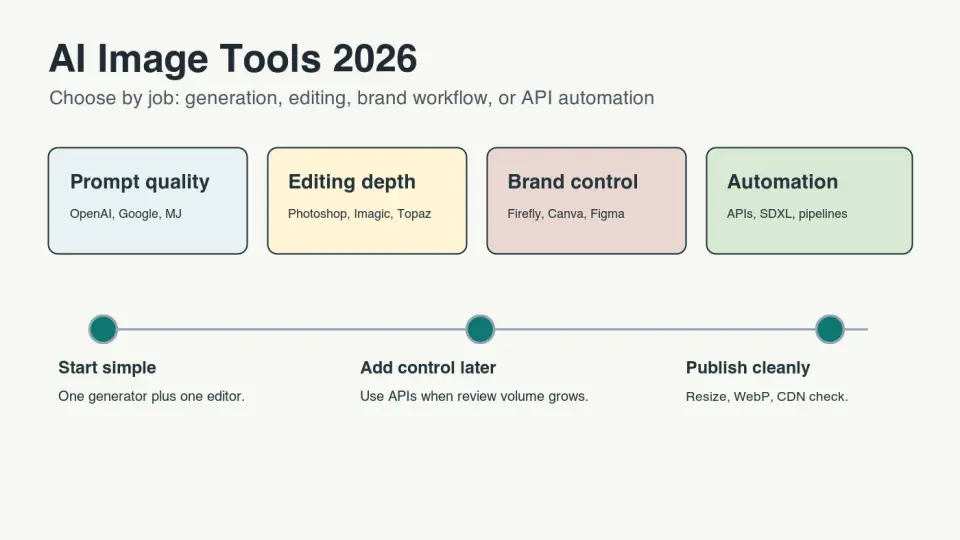
Use this comparison to choose a small stack for 2026: one generator, one editor, and a clear review step before anything reaches a product page, ad, or blog post.
Quick answer: which AI image tool should you choose in 2026?
For most marketers, store owners, and content teams, start with a general image generator plus a focused editor. Use ChatGPT image generation, Google Gemini image generation, Adobe Firefly, Midjourney, Canva, or a similar generator for concepts. Use a separate editor for cleanup, background removal, compression, resizing, and upscaling.
Choose by output risk. A mood-board image can tolerate more style variation. A product listing cannot tolerate fake labels, distorted edges, or invented details. If the image will represent a real product, inspect it like a customer would.
If you only need to clean existing images, skip the generator. Start with practical tools for background removal, resizing, compression, and upscaling. The background removal tools comparison, Batch Resize Guide, and AI Image Upscaler Guide cover those narrower workflows.
What changed in AI image tools in 2026?
The useful change is not just prettier images. The bigger shift is workflow. Image generation is now built into chat products, design suites, creative apps, and developer APIs. That makes tool choice less about a single model name and more about where review happens.
OpenAI documents image generation as an API workflow as well as an interactive product surface in its image generation guide. Google documents Imagen and Gemini image capabilities for app builders in the Gemini API image generation guide. Adobe explains Firefly access through generative credits in its generative credits FAQ.
That means a designer, seller, and developer may all say "AI image tool" while meaning different work:
- A designer may need art direction, references, inpainting, and Photoshop handoff.
- A seller may need clean product photos, transparent backgrounds, and smaller files.
- A marketer may need fast ad variants with readable text and brand-safe review.
- A developer may need an API, predictable costs, logging, and retry behavior.
- A publisher may need images that are crawlable, compressed, and relevant to the page.
Which tools are best for each job?
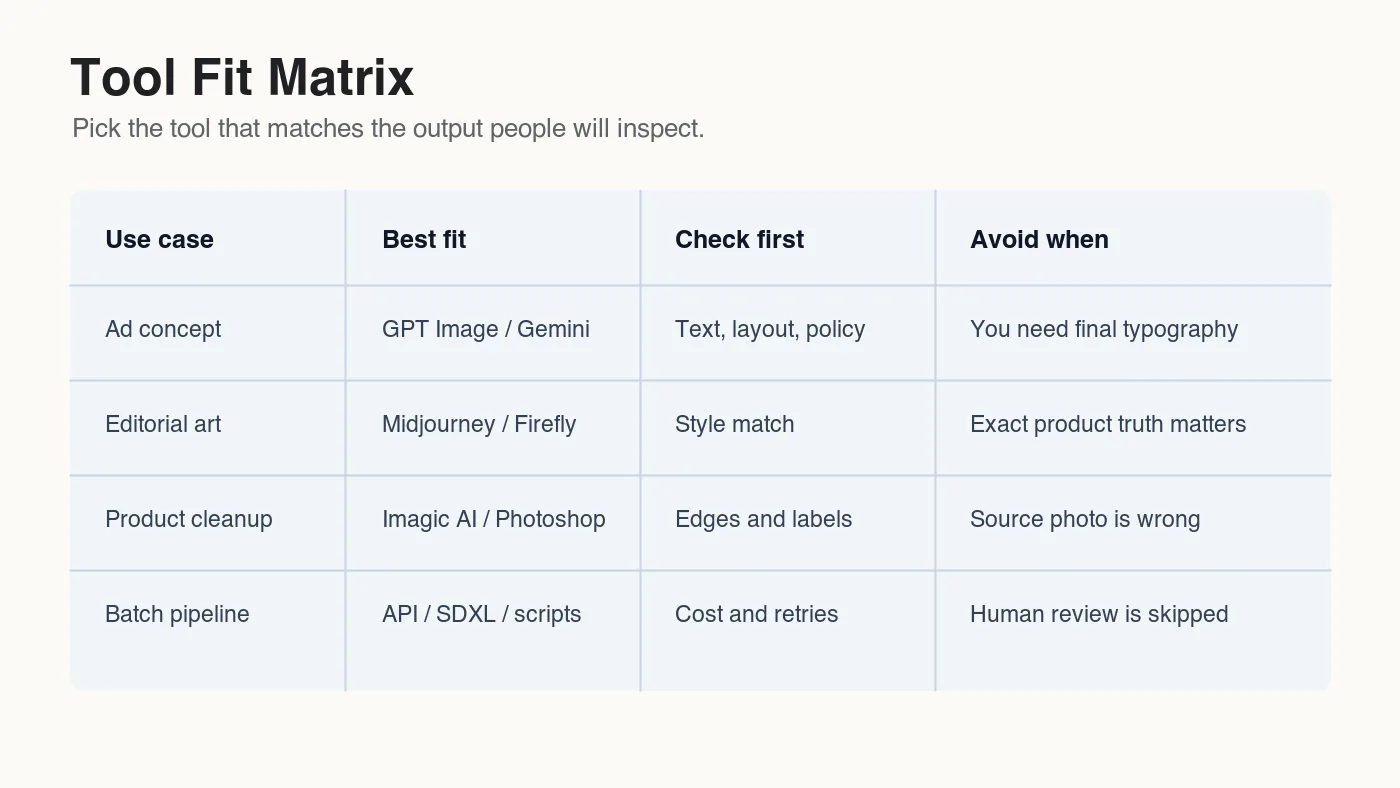
Use the table as a starting shortlist, not a permanent ranking. Pricing, quotas, and model names change quickly, so check the current plan page before buying. The more stable decision is the job you need the tool to perform.
| Job | Good fit | Why it fits | Watch before publishing |
|---|---|---|---|
| General prompt-to-image | ChatGPT image generation, Gemini, Midjourney | Fast ideation, strong prompt understanding, broad styles | Weird hands, fake text, inconsistent brand details |
| Brand and creative suite work | Adobe Firefly, Photoshop, Canva, Figma AI features | Works near existing design assets and review flows | Licensing terms, generative credit limits, template lock-in |
| Product image cleanup | Imagic AI, Photoshop, remove-background tools | Faster background removal, resize, crop, compression, format conversion | Edges, shadows, labels, transparent halos |
| Upscaling and restoration | Topaz Gigapixel, Upscayl, Magnific, local restoration models | Useful when no higher-resolution source exists | Invented texture, changed faces, altered product markings |
| Developer automation | OpenAI API, Gemini API, Stability AI, SDXL workflows | Repeatable prompts, logging, batch jobs, custom apps | Cost controls, moderation, retries, human review |
| Local control | Stable Diffusion, SDXL, ComfyUI, Automatic1111 | Model choice, LoRA workflows, private experimentation | Setup time, hardware, inconsistent defaults |
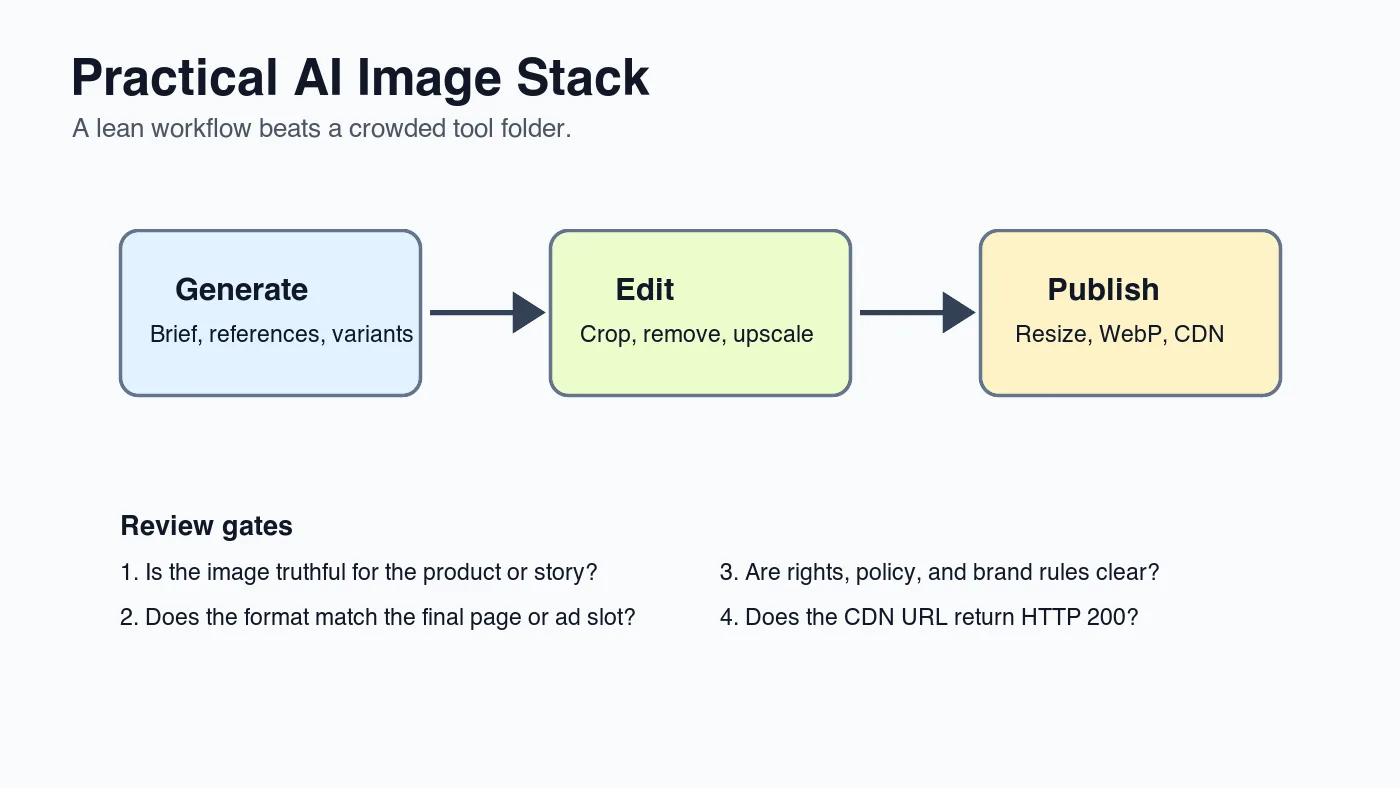
For one-person publishing, the stack can be simple:
- Generate rough concepts in one tool.
- Choose only the strongest candidate.
- Edit the chosen image in a tool built for cleanup.
- Resize to the final display size.
- Export WebP or AVIF where suitable.
- Verify the final CDN URL before publishing.
If file size becomes part of the decision, use the Image Compression Ratio Guide and AVIF vs WebP Comparison after the image is approved visually.
How should marketers compare AI image generators?
Marketers usually need speed, text handling, campaign variation, and a review path. Do not judge only by the first pretty result. Judge by how fast the tool lets you get from rough idea to approved asset.
Use this generator checklist:
- Does the tool follow a specific brief, or does it drift toward its own style?
- Can it preserve a product, person, or reference across multiple variants?
- Can it create readable text, or should text be added later in a design tool?
- Does the output need a commercial license review before use?
- Can the team share prompts, versions, and approvals?
- Does it export large enough images for the final placement?
- Can you remove or revise a single area without rebuilding the whole image?
For ads and social images, keep generated text to a minimum unless the tool is reliable in your tests. In many workflows, the safer path is to generate the visual background, then add typography in Figma, Canva, Photoshop, or your ad builder.
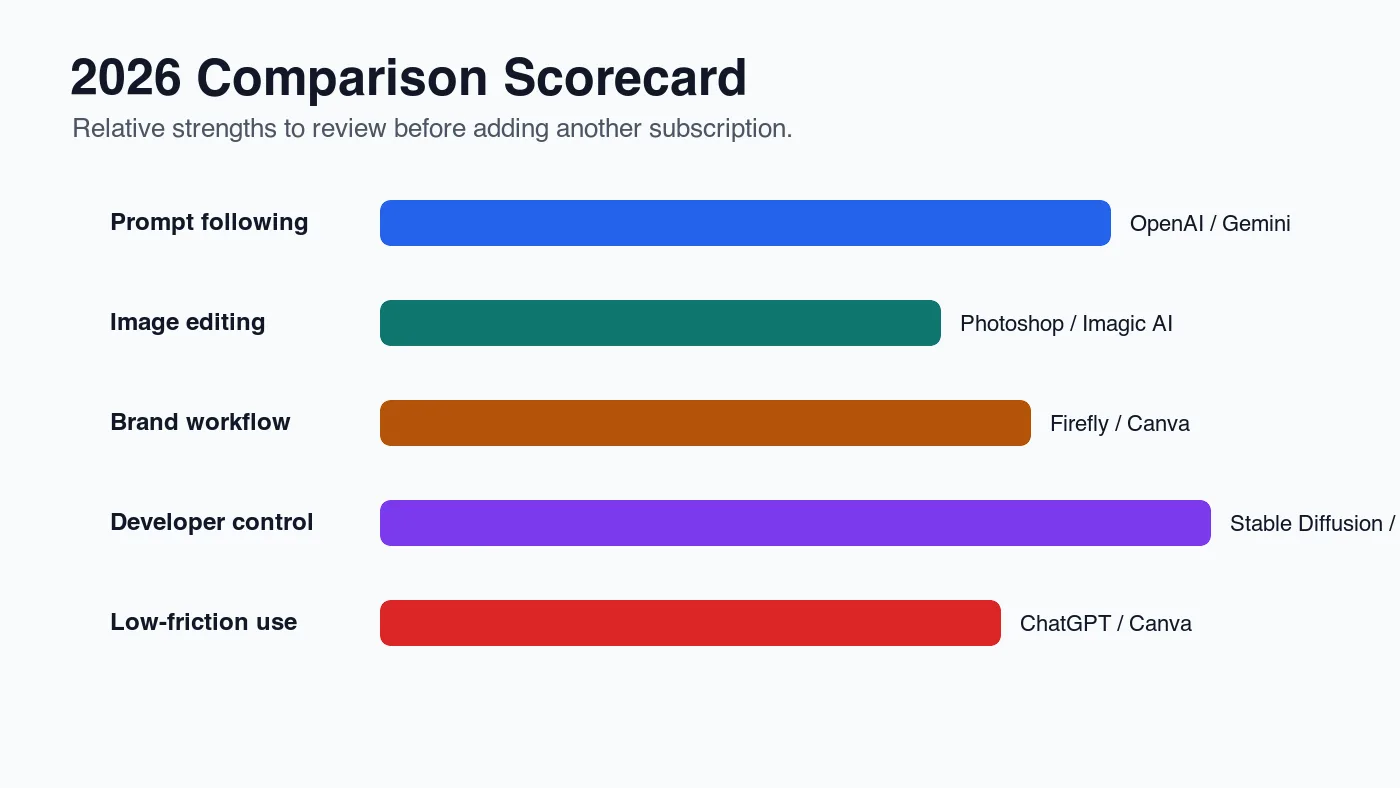
For this article, I encoded five 1400 by 788 WebP comparison graphics locally and published them to the article CDN folder. The measured files range from 28 KB to 41 KB because they are flat editorial charts. A photographic AI output at the same dimensions is usually larger, so measure your own final files instead of copying a chart setting.
Which AI image editor is best for existing photos?
If the source image already exists, an editor often beats a generator. Product sellers, marketplace teams, and bloggers usually need less invention and more cleanup: remove a background, crop the subject, sharpen a small image, compress the output, or convert the format.
| Editing task | Use first | Why | Related workflow |
|---|---|---|---|
| Remove a background | Dedicated background remover or Photoshop | Faster edge masks and transparent outputs | Background removal tools |
| Enlarge a small image | AI upscaler | Adds pixels before final resize | AI image upscaler guide |
| Resize many files | Batch resizer | Keeps dimensions and names consistent | Batch resize guide |
| Reduce page weight | WebP, AVIF, or tuned compression | Saves bytes after visual approval | Complete image optimization checklist |
| Convert formats | Format converter | Matches browser, marketplace, or CMS needs | AVIF vs WebP comparison |
For existing photos, review the boring details first. Transparent edges, product shadows, label text, and crop alignment are what customers notice. A dramatic AI restyle may look impressive in a preview and still be wrong for a catalog image.
What is the safest stack for product photos?
For product photos, use AI to repair workflow friction, not to invent product truth. A safe product stack keeps the source photo in control.
Use this order:
- Start with the highest-resolution real product photo available.
- Remove dust, crop mistakes, or background clutter.
- Remove or replace the background only if the product edge stays clean.
- Upscale only when the real source is too small for the slot.
- Resize to the marketplace or page requirement.
- Export a compressed WebP or required marketplace format.
- Inspect label text, shape, shadows, and transparency.
- Keep the original master file.
Avoid generated product images when exact packaging, ingredients, labels, medical details, safety warnings, or serial numbers matter. The same caution applies to legal documents, technical diagrams, and screenshots with small text.
Google's product and image guidance is useful here even outside Shopping campaigns. Google Images recommends descriptive alt text, relevant surrounding content, supported formats, and crawlable image URLs in its image best practices. A generated or edited image still has to behave like a normal web image.
How do API image tools compare with no-code tools?
No-code tools are better when a person is judging each image. APIs are better when the image step belongs inside a repeatable product, content pipeline, or internal tool.
Choose no-code tools when:
- The team needs quick visual exploration.
- Each image needs art direction.
- A designer must retouch the result.
- The volume is low enough for manual review.
- The tool is already part of the team's design suite.
Choose APIs or local pipelines when:
- You need the same prompt pattern hundreds of times.
- You must log inputs, outputs, and approvals.
- You need custom resizing or CDN publishing after generation.
- You are building a feature inside your own product.
- You need model choice, privacy controls, or retry logic.
Stability AI documents image generation and editing endpoints in its API reference. API access is useful, but it does not remove review. It only moves the generation step closer to your software.
How should you review AI images before publishing?
Review images at the size and context where users will see them. A generated hero image may look clean at full width but fail as an Open Graph card. A product cutout may look fine on white and show halos on gray.
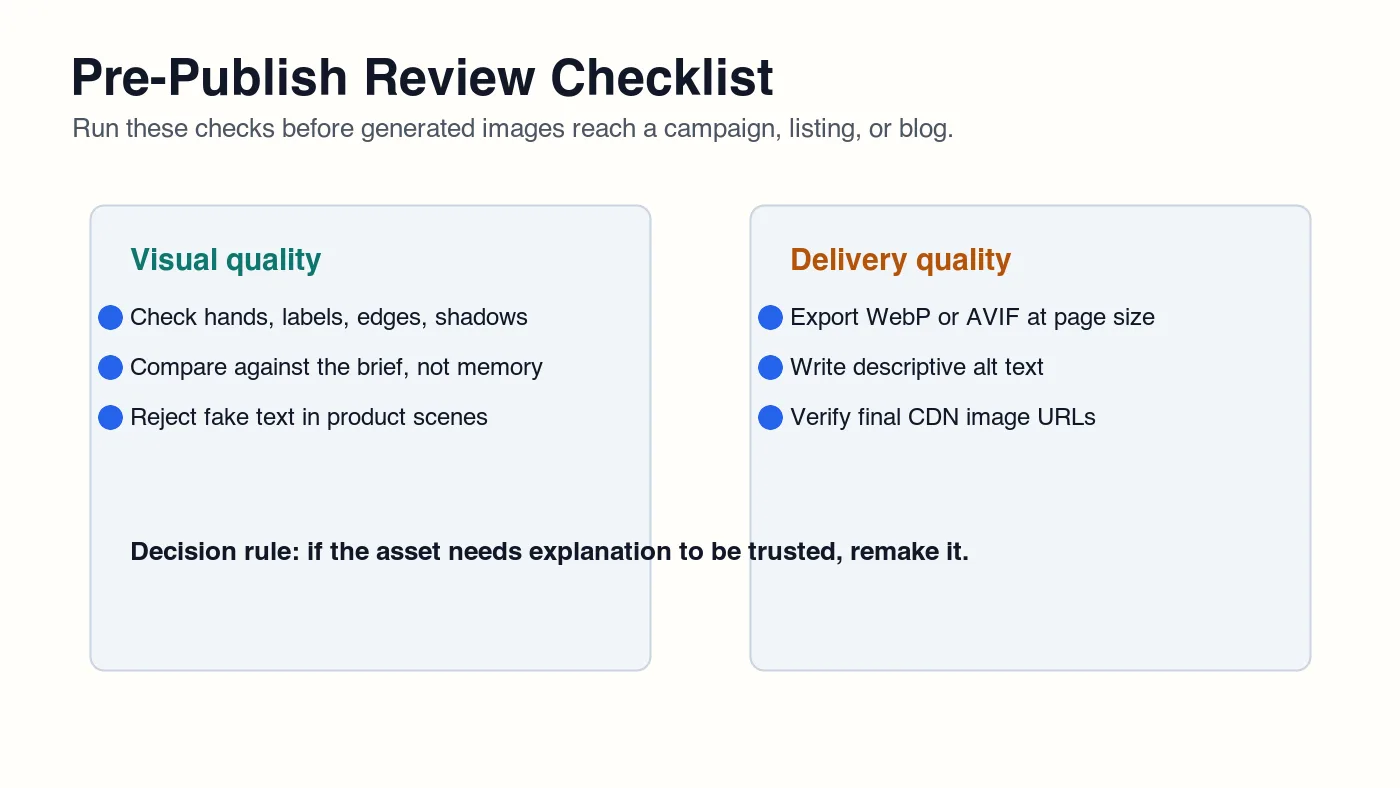
Run this checklist before publishing:
| Check | Pass condition | Fix if it fails |
|---|---|---|
| Truthfulness | The image does not invent factual product or document details | Use a real photo, recapture, or remove the risky image |
| Visual artifacts | Hands, faces, text, edges, and shadows look believable | Regenerate, retouch, or choose another candidate |
| Rights and policy | The intended use is allowed by the tool and your organization | Get approval or switch sources |
| Page fit | The image dimensions match the rendered slot | Resize or create responsive variants |
| Format | Web copy uses WebP or AVIF where appropriate | Convert after final approval |
| Accessibility | Alt text describes the visible image's role | Rewrite vague alt text |
| Delivery | The final CDN URL returns HTTP 200 | Re-publish before launch |
For a blog article, the image should help the reader understand the page. Decorative generated art can be worse than no image if it distracts from the task. For a product page, the image should make the product easier to evaluate.
Final recommendation
Do not subscribe to every AI image tool. Pick the smallest stack that covers your real jobs.
For content and marketing, start with one generator for concepts and one editor for cleanup. For e-commerce, start with real product photos and use AI for background removal, upscaling, resizing, and compression. For software products, use APIs only when repeatability, logging, and integration matter.
The winning 2026 workflow is not the tool with the flashiest gallery. It is the workflow where someone can inspect the image, correct it, export it in the right format, and publish a URL that works.
Frequently asked questions
What is the best AI image tool overall in 2026?
There is no single best tool; pair one generator for concepts with one editor for cleanup, then match the pairing to the job.
Which AI image generator should I use for concept art?
Use ChatGPT image generation, Google Gemini, Adobe Firefly, Midjourney, or Canva for fast concept ideation.
Which tool is best for cleaning up existing product photos?
Use a dedicated background remover, Photoshop, or an editor like Imagic AI for background removal, resizing, and compression rather than a generator.
Should I use AI to generate product images from scratch?
Avoid generated product images whenever exact packaging, labels, or serial numbers matter, and keep a real product photo as the source instead.
How do API image tools compare with no-code generators?
Choose APIs and local pipelines for repeatable, logged, high-volume jobs, and choose no-code tools when a person reviews each image individually.
What should I check before publishing an AI-generated image?
Run it through a truthfulness, artifact, rights, page-fit, format, accessibility, and delivery check before it goes live.
Do I need both an AI image generator and an editor?
Most teams need both: a generator for rough concepts and a separate editor for background removal, resizing, and compression.
What image format should I export after editing?
Export WebP or AVIF once the image is visually approved, since format conversion should happen last, after visual approval.
Use the free tools while you follow the guide.
Keep reading
2026-09-13
How to Blur Faces and License Plates Before You Post
Blur or pixelate faces and license plates so they stay unreadable. Which method actually anonymizes, what fails, and how to avoid leaking EXIF location data.
2026-08-27
Invisible Watermarks: What Image Files Now Carry in 2026
Paint embeds a server-issued GUID in AI images, platforms strip C2PA manifests, and a plain WebP export drops all of it. What your files really carry, and how to check.

2026-07-28
Batch Image Processing: Pipeline Order, Settings, and Tools
Batch image processing runs resize, compress, and convert jobs across whole folders. The pipeline order, measured quality settings, tool choice, and automation.