2026-03-10 · Updated 2026-07-26
HEIC to PNG: Convert iPhone Photos to Lossless PNG
Convert HEIC iPhone photos to PNG when you need lossless quality or transparency. Real size trade-off, the Mac/Windows/CLI methods, and when PNG is the wrong choice.
Last updated: July 26, 2026
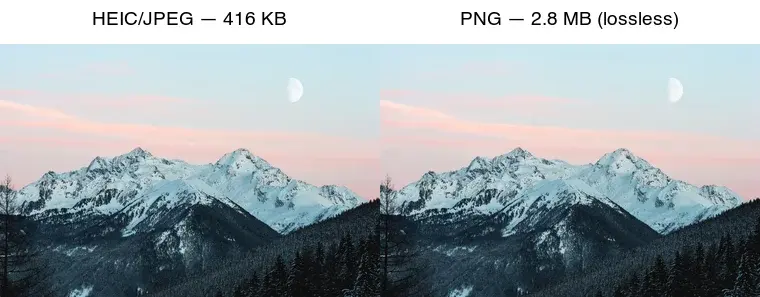
Converting HEIC to PNG is the right move when you need a lossless copy — for editing, archiving, or sharp graphics — because PNG preserves every pixel without re-compression artifacts. The trade-off is size: a PNG of a photograph is far larger than the HEIC or a JPEG. This guide covers when HEIC to PNG is worth it, the real size cost, and how to do it on any platform.
Quick answer: should you convert HEIC to PNG?
Only when you specifically need lossless. Match the target to the goal:
| Goal | Target | Why |
|---|---|---|
| Share / upload / email | JPEG | Universal, small |
| Edit, archive, master | PNG | Lossless, no re-compression |
| Web image | WebP | Smaller than PNG, supports alpha |
| Keep maximum quality | Keep the HEIC | Already efficient and high quality |
For most sharing, JPEG is the better target than PNG (see HEIC to JPG). Reach for PNG only when lossless matters.
Why convert HEIC to PNG?
PNG is lossless: it stores every pixel exactly, with no quality loss from re-compression. HEIC and JPEG are both lossy, so every time you re-encode between them you lose a little detail. Converting HEIC straight to PNG (one step, from the original) gives you a perfect, artifact-free master you can then edit, crop, or re-export to any other format without compounding loss.
PNG also supports a full alpha channel (transparency), which neither HEIC photos nor JPEG have — useful if you are cutting out a subject. The cost is file size: PNG is dramatically larger than HEIC or JPEG for photographs, because lossless storage of photographic noise is expensive.
How much larger is PNG than HEIC?
Measured on one 2000px photograph:
| Format | Size | Type |
|---|---|---|
| HEIC | ~208 KB | Lossy (efficient) |
| JPEG q85 | 416 KB | Lossy (compatible) |
| PNG | 2.8 MB | Lossless |
| TIFF (LZW) | 3.3 MB | Lossless (print) |
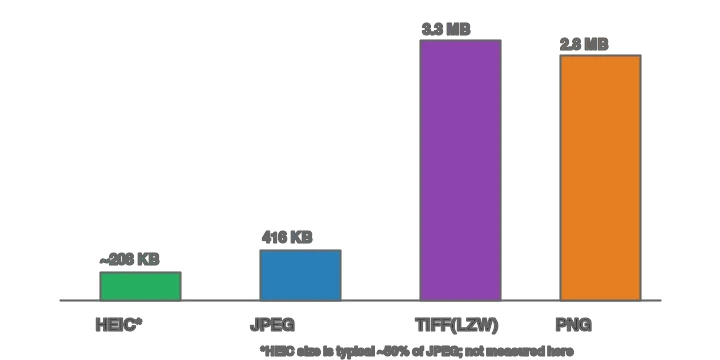
PNG's 2.8 MB is roughly 13× the HEIC and 7× the JPEG. That is the price of lossless — acceptable for a master you store once, wasteful for a web image. Each format owns a stage of the pipeline:

Method 1: Web converter
For one image, use the Imagic AI Image Converter: upload the HEIC, choose PNG, and download. Because PNG is lossless, there is no quality slider — the output matches the input pixel-for-pixel. This is the simplest path on any device.
Method 2: Mac (built-in)
macOS reads HEIC natively, so PNG export is built in:
- Preview: open the HEIC, File → Export, choose PNG.
- Photos: select, File → Export → Export 1 Photo → PNG (if available) or export Unmodified then convert.
sips:sips -s format png input.heic --out output.png.
Method 3: Windows
With the free HEIF/HEVC extensions installed, open the HEIC in the Photos app and "Save as" PNG. For batch, ImageMagick with a HEIC delegate handles a folder.
Method 4: Command line (batch)
## ImageMagick (needs a HEIC delegate — libheif)
mkdir -p out
for f in *.heic; do magick "$f" "out/${f%.*}.png"; done

## heif-convert (from libheif)
heif-convert input.heic output.png
PNG output needs no quality flag — it is lossless by default. See the batch resize guide for the parallel-folder pattern.
How does PNG compression compare to HEIC and JPEG?
PNG uses lossless DEFLATE compression (the same algorithm as ZIP) plus predictive filtering, so it never discards pixel data — but it also cannot exploit the fact that the human eye tolerates loss in photographs. HEIC and JPEG use lossy methods (DCT/quantization and HEVC intra-frame coding) that throw away high-frequency detail the eye barely sees, which is why they are 7–13× smaller than PNG on the same photo.
The MDN image format reference lays out which formats are lossy versus lossless and where each is supported. The practical consequence: PNG's lossless advantage is real but expensive, so reserve it for graphics, text, and editing masters — not for web delivery of photographs, where lossy formats win on every metric that matters for the web. For web photographs, convert HEIC to WebP instead (see the WebP converter guide).
When is HEIC to PNG the wrong choice?
- For web images. A 2.8 MB PNG is a terrible web image; use WebP or JPEG. See image formats explained.
- For sharing/email. JPEG is smaller and universally supported.
- When you just need compatibility. JPEG, not PNG, is the compatibility format.
- For storage efficiency. HEIC is already efficient and high quality; keeping it beats a 13× larger PNG unless you need lossless.
Should you archive HEIC or PNG?
For a personal archive, keep the HEIC (or export a TIFF master) — both preserve quality efficiently. PNG is fine for an editing master you will work from repeatedly, but its size adds up across thousands of photos. The pragmatic rule: keep the original HEIC as the source of truth, and export PNG (or JPEG, or WebP) on demand.
Common mistakes
- Using PNG for web photos. It is 7–13× larger than necessary. Use WebP/JPEG.
- Converting HEIC → JPEG → PNG. Each lossy step adds artifacts; go HEIC → PNG directly for a clean master.
- Expecting PNG to be small. Lossless photographic storage is inherently large.
- Forgetting transparency is separate. A flat HEIC photo has no transparency; PNG of it is just a lossless photo, not a cutout. See transparent images.
- Deleting the HEIC after converting. Keep the original; the PNG is a derived master.
Frequently asked questions
Should I convert HEIC to PNG?
When you need lossless quality and universal compatibility, yes — PNG preserves every pixel and opens everywhere. The cost is file size: PNG is much larger than HEIC. Convert to PNG for editing masters; keep HEIC or convert to JPG for sharing.
How much larger is PNG than HEIC?
Several times larger, because PNG is lossless and HEIC is lossy-compressed. A 2 MB HEIC photo becomes a 10+ MB PNG. Use PNG only when lossless matters; for web and sharing, convert to JPG or WebP instead.
Does converting HEIC to PNG lose quality?
No — PNG is lossless, so the conversion preserves the image exactly as the HEIC decoded it. The trade-off is file size, not quality. PNG is the right master format if you will edit further.
Can I batch convert HEIC to PNG?
Yes — macOS Preview and Automator batch-convert, and command-line tools (ImageMagick) handle folders. For large batches, prefer JPG or WebP output to avoid the PNG file-size penalty. See the batch processing guide.
When should I keep HEIC instead of converting?
When storage matters and compatibility is not an issue — HEIC is about half the size of JPEG. Convert to JPG or PNG only when you need to share with a system that does not accept HEIC.
Why convert HEIC to PNG instead of JPG?
When you need lossless quality for further editing — PNG preserves every pixel exactly, while JPG adds a generation of lossy compression. The cost is file size: PNG is several times larger than HEIC or JPG. Convert to PNG for masters you will edit; convert to JPG or WebP for sharing and web.
Why convert HEIC to PNG?
When you need lossless quality for further editing — PNG preserves every pixel, while JPG adds a generation of lossy compression. The cost is file size: PNG is several times larger than HEIC. Convert to PNG for masters you will edit; to JPG or WebP for sharing and web.
When should I keep HEIC?
When storage matters and compatibility is not an issue — HEIC is about half the size of JPEG. Convert to JPG or PNG only when you need to share with a system that does not accept HEIC. For everyday phone photography, HEIC is the efficient default.
Does converting HEIC to PNG preserve quality?
Yes, fully — PNG is lossless, so the conversion keeps every pixel exactly as the HEIC decoded it. The trade-off is file size: PNG is several times larger than HEIC. Convert to PNG when you need a lossless master for editing; convert to JPG or WebP for sharing and web, where the smaller size matters more than perfect fidelity.
Image credits
- HEIC/PNG comparison, format size comparison, and where-formats-belong diagrams — generated by the author from a landscape photograph (Pexels #1287145, photo by eberhard grossgasteiger) to show real measured sizes and PNG's lossless role.
Use the free tools while you follow the guide.
Keep reading
2026-09-13
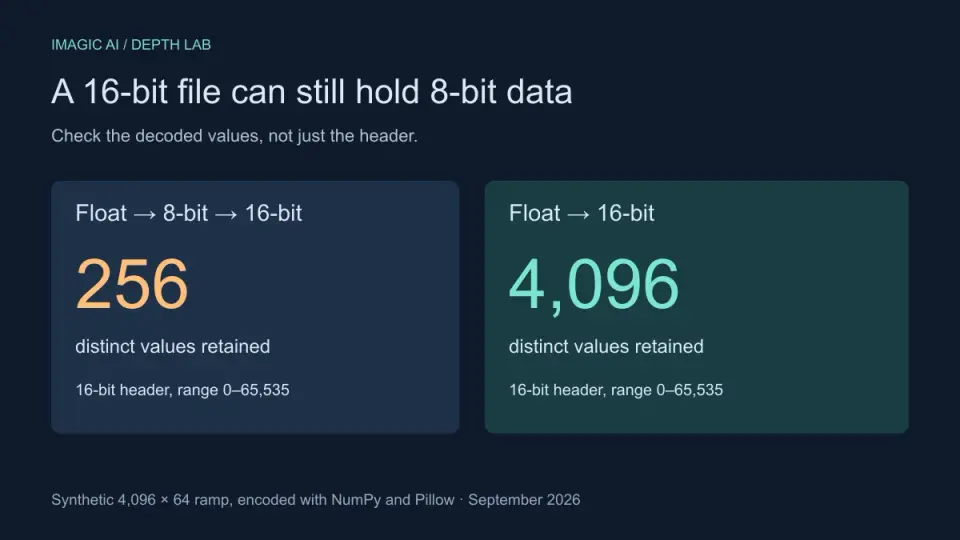
16-Bit Depth Maps: Fix Banding and Verify Your PNG
Fix stair-stepped or inverted depth maps with a reproducible 8-bit vs 16-bit PNG test, a file inspection script, and a practical Blender import checklist.
2026-09-13
GIF Maker From Images: Build Animated GIFs That Load Fast
Turn a set of images into an animated GIF for web and social media. Real frame timing, size limits for each platform, and when to choose GIF over video.
2026-09-13
Screenshot to Image: Save, Format, and Optimize Screenshots
Capture screenshots on any device, save them in the right format, and compress them for web without blurring text. Real steps for PNG, WebP, and full-page capture.